The Problem That Started It All
Let me tell you about a problem that probably sounds familiar: You're building web applications for your company, and every time the product team wants to change a button label, update help text, or fix a typo, they need to file a ticket, wait for a developer, and go through an entire deployment cycle. Multiply this by 10 languages, and you've got yourself a productivity nightmare.
But there's more. We tried using third-party tools like Walkme and Pendo to solve this. And they created an entirely different nightmare: performance hell.
These tools work by rendering a parallel layer on top of your React or Angular app. They manipulate the DOM independently of your framework's lifecycle, causing conflicts with Angular's change detection and React's virtual DOM. The result? Page loads that took 2-5 seconds longer, janky interactions, and a degraded user experience. Plus, we were paying $500-2000/month for the privilege of making our app slower.
I knew there had to be a better way.
The Vision: Native Framework Integration
The core idea behind ContentFlow CMS was simple but powerful: work WITH frameworks, not against them.
Instead of running parallel to your app like third-party tools, ContentFlow would be a native library that integrates seamlessly into your codebase. Think of it as an SDK that developers include just like any other package—except this one gives product teams superpowers.
Here's what I envisioned:
For Developers
import { ContentComponent } from '@contentflow/sdk/react';

<ContentComponent
  contentId="hero-title"
  defaultText="Welcome to ContentFlow"
  data-content-id="hero-title"
/>
That's it. One component replaces your static text. It works with React hooks, Angular services, or vanilla JavaScript. No performance overhead. No framework conflicts. Just clean, framework-native integration.
For Product Teams
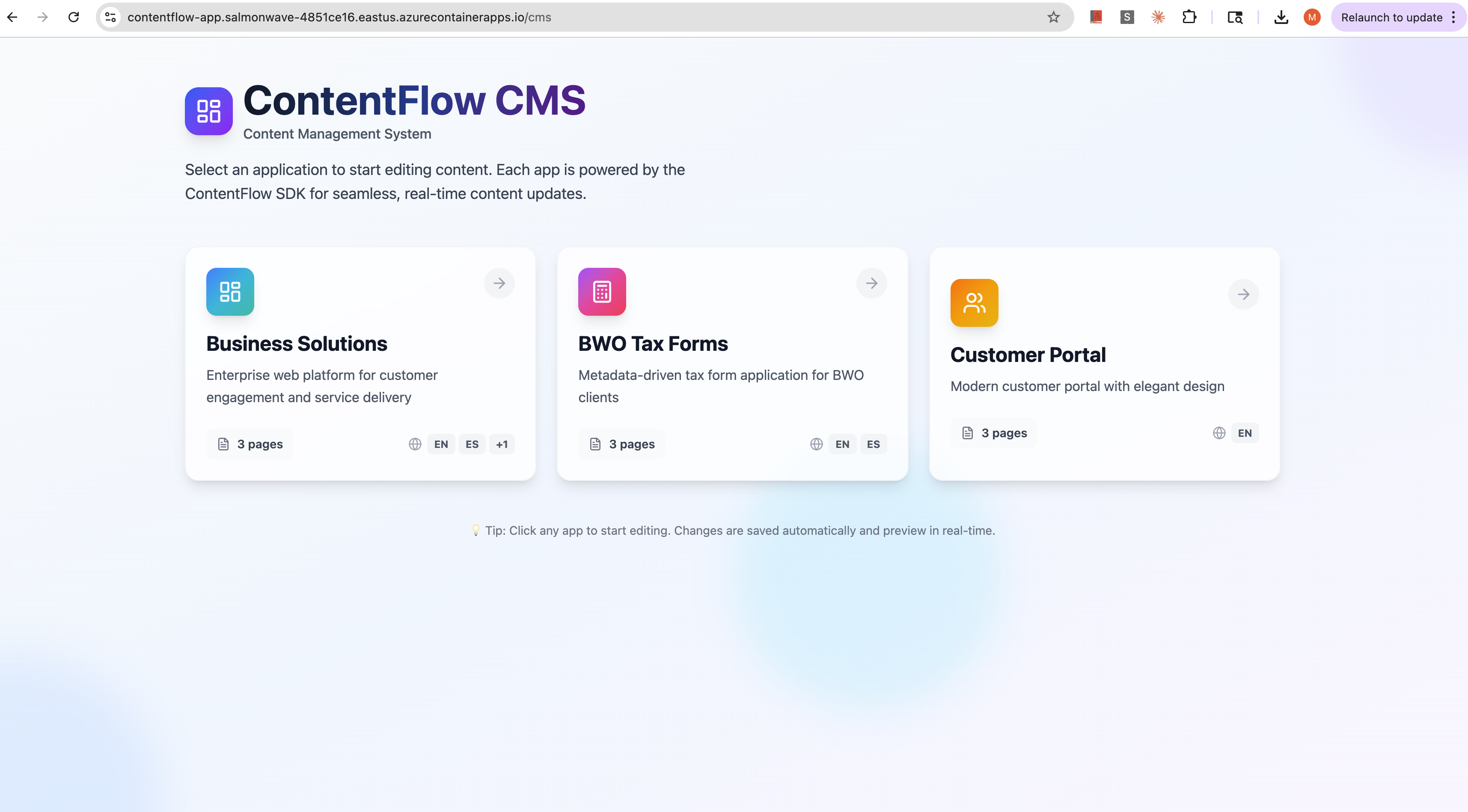
A beautiful CMS interface where you can:
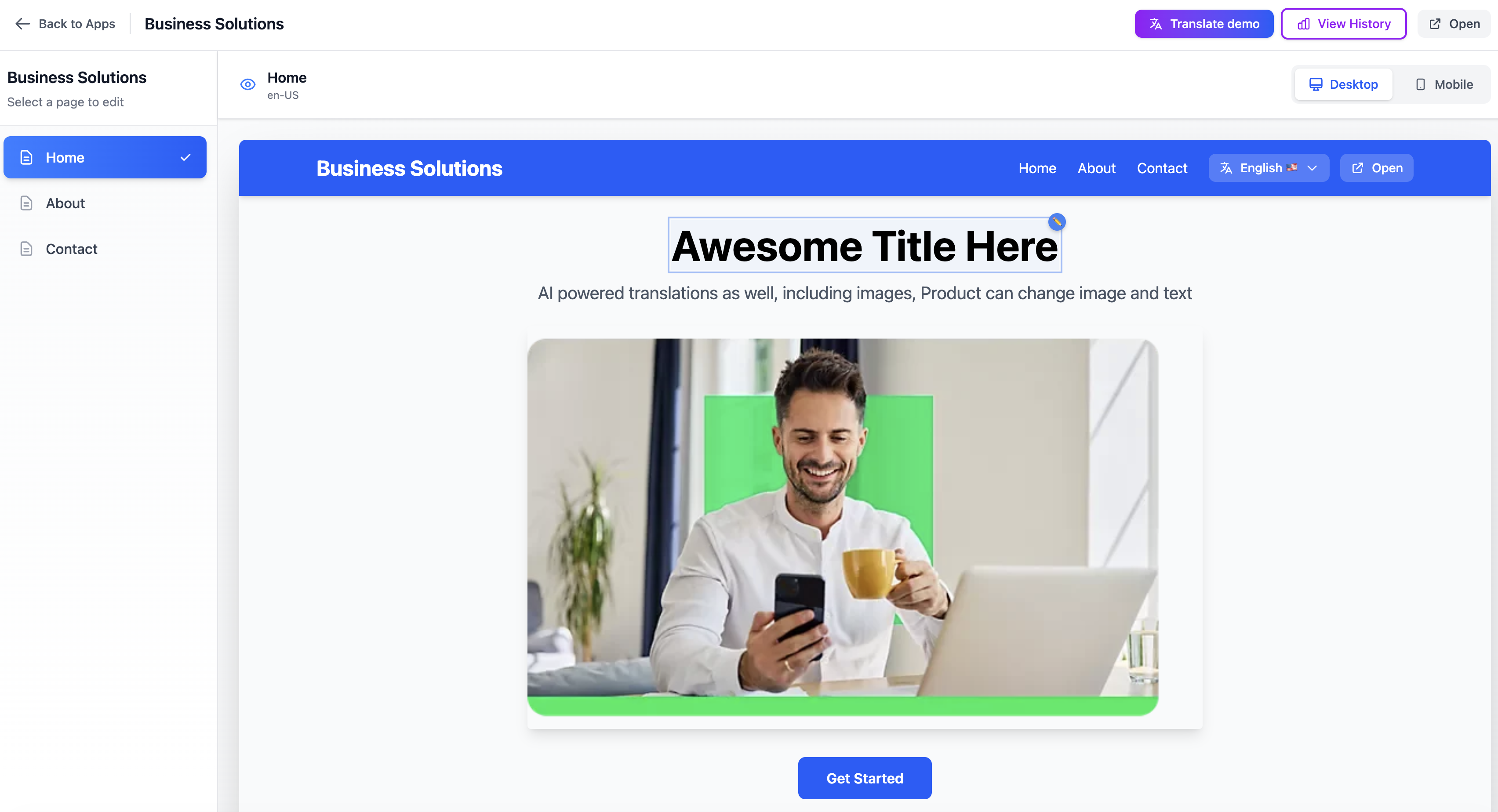
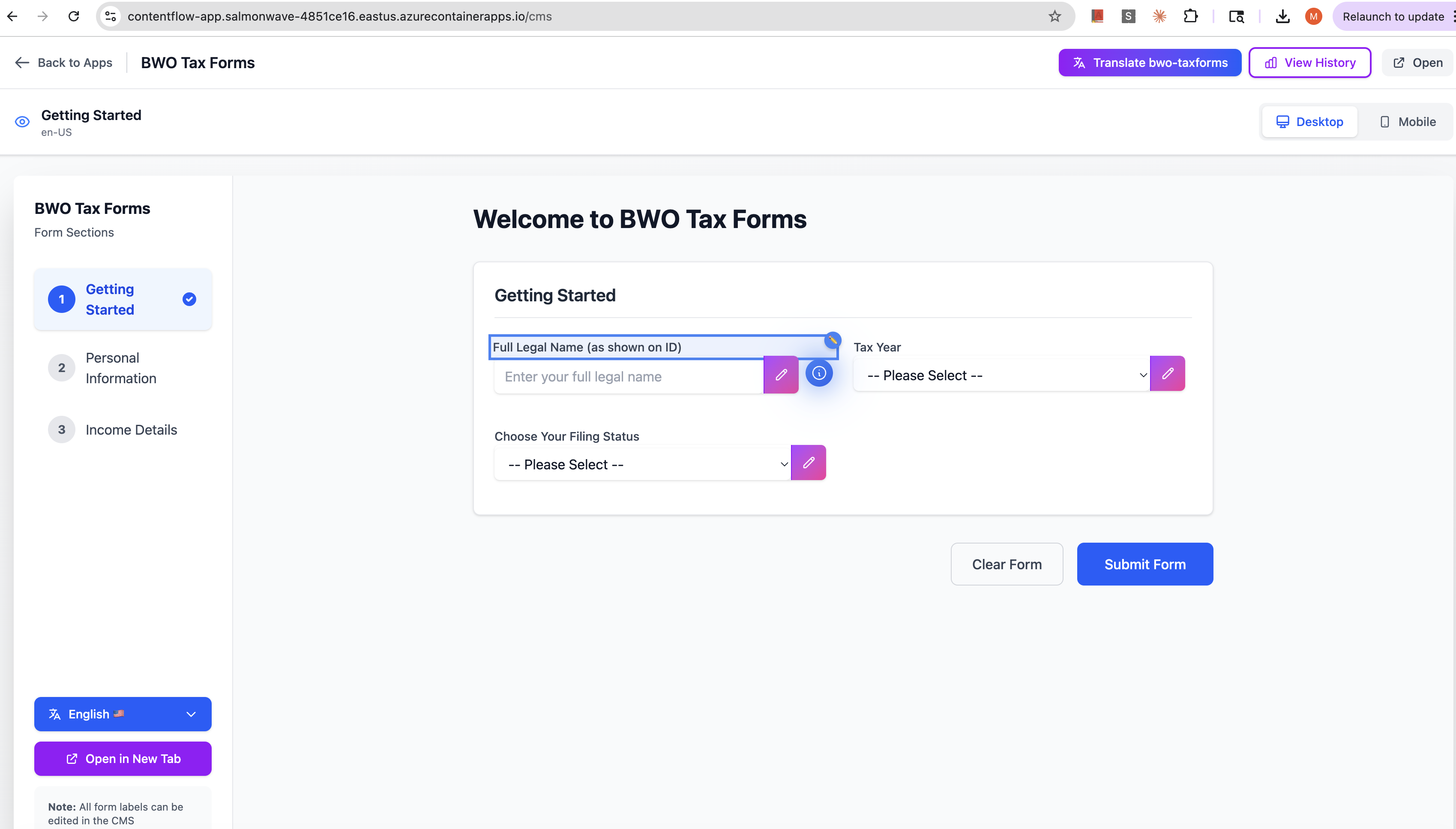
- See a live preview of your app in an iframe
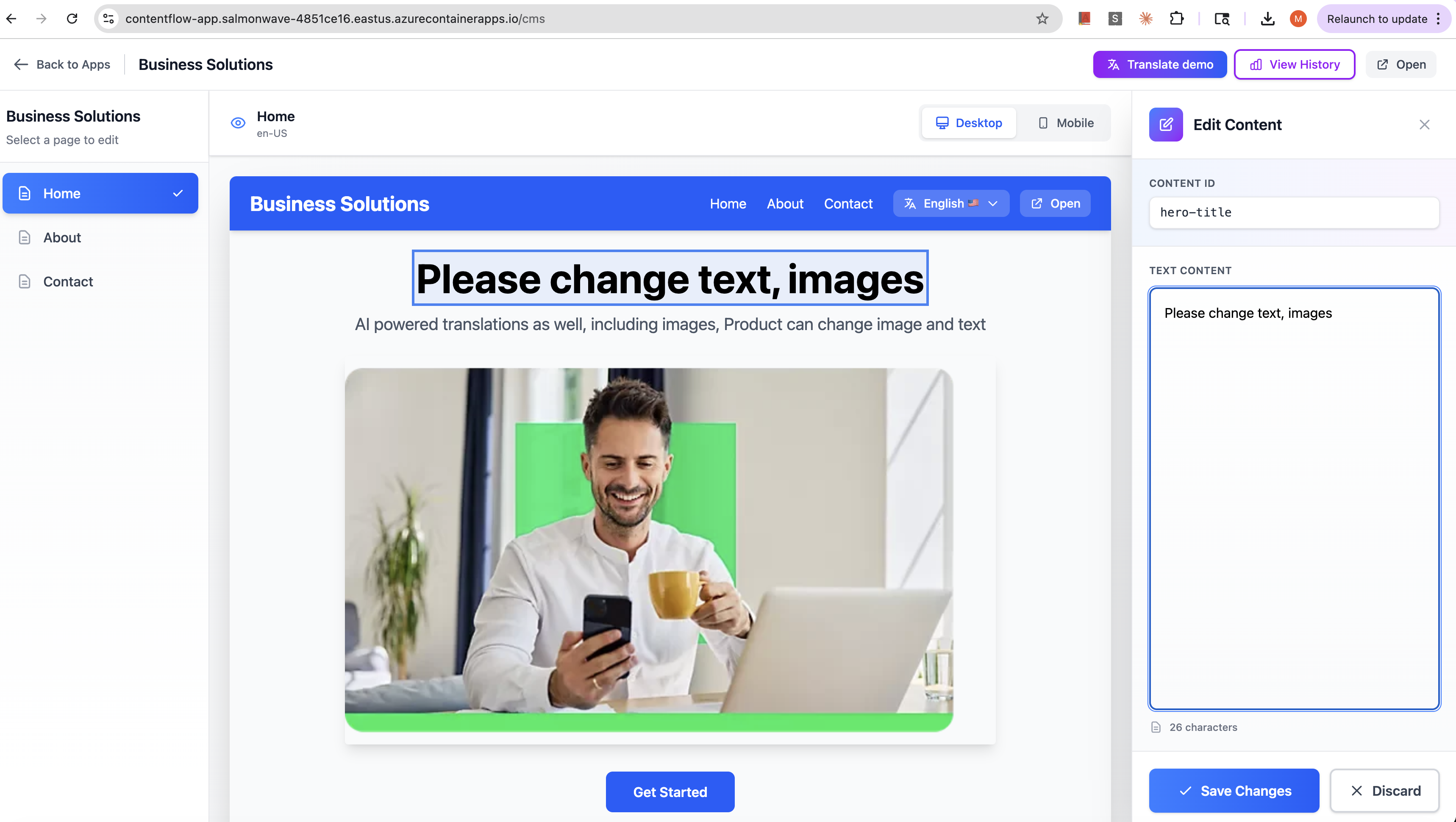
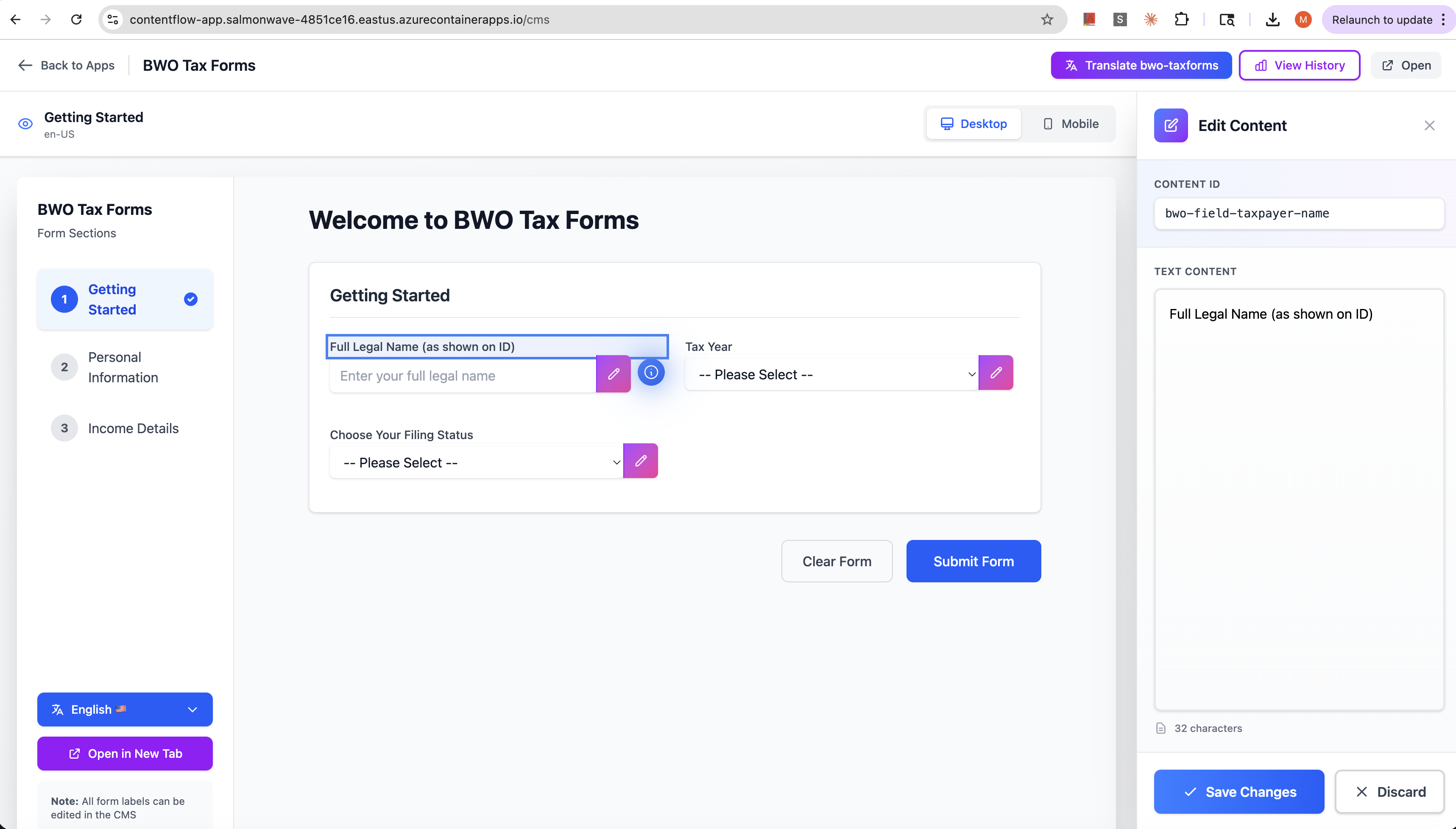
- Click on any text element to edit it
- Switch between languages instantly
- Hit "Translate All" to bulk-translate content using AI
- Publish changes that go live immediately
No code changes. No developer involvement. No deployment pipelines.
The Architecture: Three Simple Layers
I designed ContentFlow around three core components:
1. The CMS Portal (React + Tailwind)
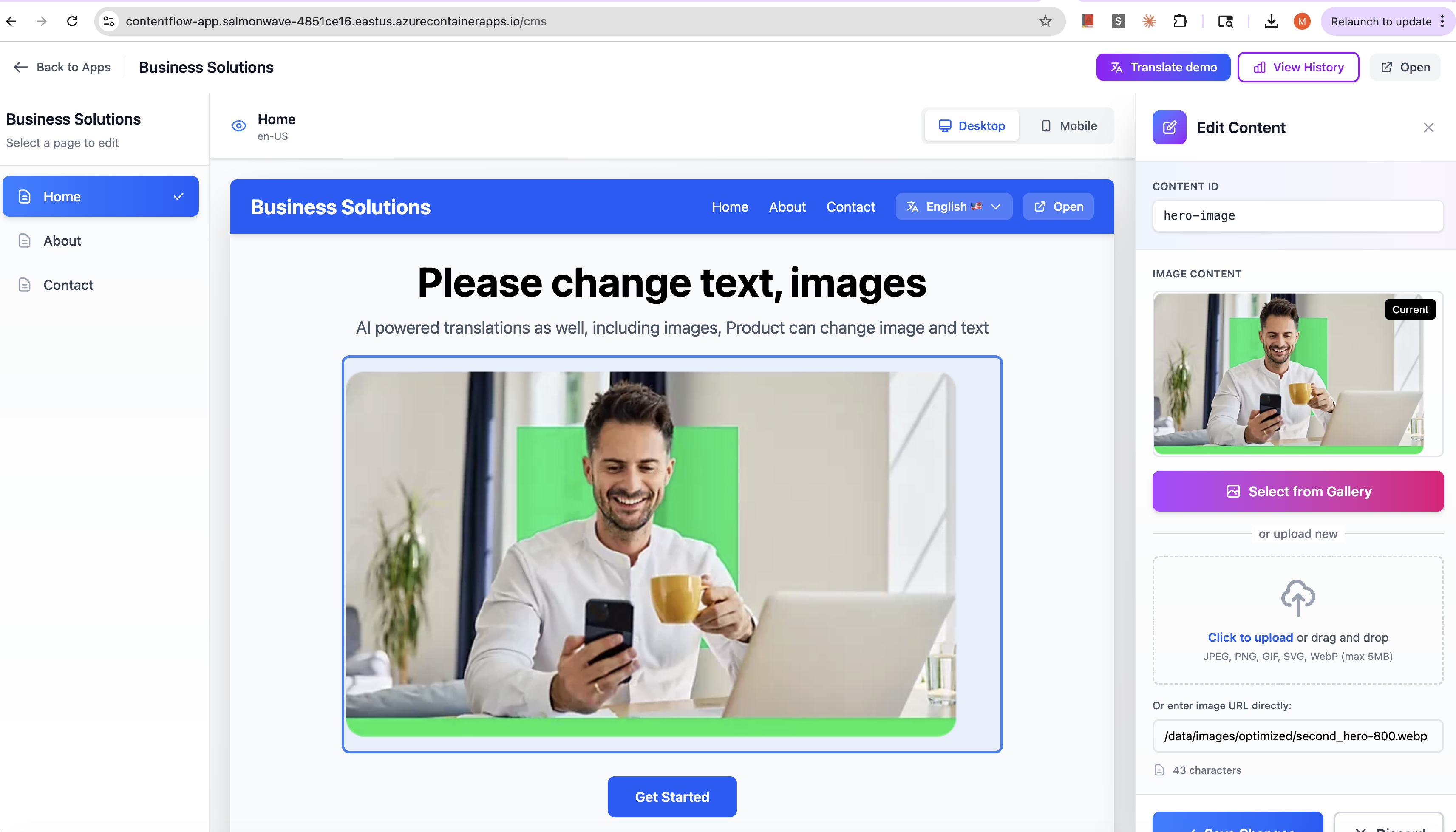
A state-of-the-art visual editor inspired by modern design tools. You hover over elements in the preview iframe, and they highlight. Click the pencil icon, edit in the sidebar panel, save—and watch your changes appear instantly.
2. The Unified Server (Bun + Azure)
Instead of running 5 separate dev servers, I built one consolidated Bun server that:
- Hosts all apps under a single domain (
/cms,/bwo,/demo,/portal) - Stores content in simple JSON files during development
- Uploads to Azure Blob Storage for production
- Scales from 0 to 3 replicas based on traffic (scale-to-zero = near-zero cost)
- Optimizes uploaded images automatically using Sharp
3. The Framework-Agnostic SDK
The heart of the system. Zero dependencies in the core. Works with:
- React:
<ContentComponent>with hooks - Angular:
<content-component>Web Component - Any framework: Custom adapters follow the same pattern
The SDK loads all content in a single JSON file per page (not 100 individual API calls like third-party tools). Content hydrates asynchronously in the background while displaying default text synchronously—zero flash of empty content.
Architecture Comparison: Why ContentFlow is Faster
Here's a visual breakdown of how the two approaches differ fundamentally:
┌─────────────────────────────────────────────────────────────────────────┐
│  ❌ THIRD-PARTY TOOLS (Walkme/Pendo) - Parallel Rendering               │
└─────────────────────────────────────────────────────────────────────────┘

    Browser Window
    ┌─────────────────────────────────────────────────────────────┐
    │                                                               │
    │  ┌─────────────────────────────────────────────┐            │
    │  │  Your React/Angular App                      │            │
    │  │  ┌──────────────────────────────────────┐  │            │
    │  │  │ Component Tree                        │  │            │
    │  │  │ Virtual DOM / Change Detection       │  │            │
    │  │  │ Renders: Buttons, Forms, Text        │  │            │
    │  │  └──────────────────────────────────────┘  │            │
    │  └─────────────────────────────────────────────┘            │
    │                      ↓                                       │
    │           ⚠️ CONFLICT ZONE ⚠️                               │
    │                      ↓                                       │
    │  ┌─────────────────────────────────────────────┐            │
    │  │  Third-Party Script (200-500KB)             │            │
    │  │  ┌──────────────────────────────────────┐  │            │
    │  │  │ • Scans entire DOM tree              │  │            │
    │  │  │ • Re-renders elements in parallel    │  │            │
    │  │  │ • Overrides framework lifecycle      │  │            │
    │  │  │ • Makes 10-50 API calls              │  │            │
    │  │  │ • Loads external scripts             │  │            │
    │  │  │ • Injects custom CSS                 │  │            │
    │  │  └──────────────────────────────────────┘  │            │
    │  └─────────────────────────────────────────────┘            │
    │                                                               │
    └─────────────────────────────────────────────────────────────┘

    Performance Impact:
    ❌ +2-5 seconds page load (script + API calls)
    ❌ Framework conflicts (Angular change detection, React reconciliation)
    ❌ Continuous DOM manipulation (janky UX)
    ❌ 200-500KB bundle overhead
    ❌ 10-50 network requests per page


┌─────────────────────────────────────────────────────────────────────────┐
│  ✅ CONTENTFLOW SDK - Native Integration                                │
└─────────────────────────────────────────────────────────────────────────┘

    Browser Window
    ┌─────────────────────────────────────────────────────────────┐
    │                                                               │
    │  ┌─────────────────────────────────────────────┐            │
    │  │  Your React/Angular App                      │            │
    │  │  ┌──────────────────────────────────────┐  │            │
    │  │  │ Component Tree                        │  │            │
    │  │  │   ├─ Header                          │  │            │
    │  │  │   ├─ <ContentComponent> (8-15KB SDK)│  │            │
    │  │  │   │    ├─ Uses React hooks           │  │            │
    │  │  │   │    ├─ Uses Angular services      │  │            │
    │  │  │   │    ├─ Zustand store (1KB)        │  │            │
    │  │  │   │    └─ Renders from JSON (1 req)  │  │            │
    │  │  │   ├─ Form                             │  │            │
    │  │  │   └─ Footer                           │  │            │
    │  │  │                                        │  │            │
    │  │  │ Virtual DOM / Change Detection       │  │            │
    │  │  │ ✅ No conflicts, native lifecycle    │  │            │
    │  │  └──────────────────────────────────────┘  │            │
    │  └─────────────────────────────────────────────┘            │
    │                                                               │
    │  Single JSON Request (once per page):                       │
    │  ┌─────────────────────────────────────────────┐            │
    │  │ GET /data/app-page-en-US.json               │            │
    │  │ {                                             │            │
    │  │   "hero-title": "Welcome",                   │            │
    │  │   "cta-button": "Get Started"                │            │
    │  │ }                                             │            │
    │  └─────────────────────────────────────────────┘            │
    │                                                               │
    └─────────────────────────────────────────────────────────────┘

    Performance Impact:
    ✅ +50-200ms page load (single JSON fetch)
    ✅ Zero framework conflicts (native components)
    ✅ No runtime DOM manipulation (uses framework lifecycle)
    ✅ 8-15KB bundle size (SDK only)
    ✅ 1-2 network requests per page


┌─────────────────────────────────────────────────────────────────────────┐
│  KEY ARCHITECTURAL DIFFERENCES                                          │
└─────────────────────────────────────────────────────────────────────────┘

Third-Party Tools               ContentFlow SDK
─────────────────               ───────────────
External Script                 Native Library
Parallel Rendering              Framework Integration
Override Lifecycle              Use Framework Lifecycle
Multiple API Calls              Single JSON Fetch
DOM Manipulation                Virtual DOM / Change Detection
200-500KB Bundle                8-15KB Bundle
$500-2000/month                 $7/month self-hosted


┌─────────────────────────────────────────────────────────────────────────┐
│  THE RESULT: 10-25x FASTER PAGE LOADS                                  │
└─────────────────────────────────────────────────────────────────────────┘

Third-Party: [████████████████████████████] 5000ms
ContentFlow: [██] 200ms
The Performance Story: From 5 Seconds to 200ms
Let me show you the before-and-after:
| Metric | Walkme/Third-Party | ContentFlow |
|---|---|---|
| Page Load Impact | +2-5 seconds | +50-200ms |
| Runtime Updates | Continuous DOM manipulation | None (uses framework lifecycle) |
| Network Requests | 10-50 per page | 1-2 per page |
| Bundle Size | 200-500 KB | 8-15 KB |
| Framework Conflicts | Frequent | Zero |
The difference comes down to architecture. Instead of fighting the framework, we embrace it. No parallel rendering, no DOM hijacking, no lifecycle conflicts. Just clean, native integration that feels like it was always part of your app.
The Cost Story: $2,000/month to $7/month
Yes, you read that right.
Third-party tools charge $500-2000/month. Our total Azure hosting cost? $7/month.
Here's the breakdown:
- Azure Container Apps (scale-to-zero): ~$5/month for low traffic
- Azure Blob Storage: ~$1/month for content files
- Azure CDN: ~$1/month for content delivery
- AI Translation (gpt-5.1): ~$0.001 per translation for an app
That's a 99% cost savings while delivering better performance.
The Features: What We Built
✅ Multi-App Content Management
Manage 4 apps from a single CMS:
- BWO Tax Forms (metadata-driven forms)
- Demo App (simple showcase)
- Customer Portal (client-facing)
- CMS itself
✅ Multi-Language Support
5 languages out of the box:
- English (US)
- Spanish (ES)
- French (FR)
- German (DE)
- Japanese (JP)
✅ AI-Powered Translation
Click "Translate All" and watch OpenAI's gpt-5.1 translate your entire app to all languages in seconds. Cost per batch: $0.005 (half a cent).
✅ Image Optimization
Upload an image, and the server automatically generates:
- Thumbnail (150px)
- Small (400px) for mobile
- Medium (800px) for tablet
- Large (1200px) for desktop
- WebP format for all sizes
All processed server-side with Sharp. No Azure Functions needed. Zero additional cost.
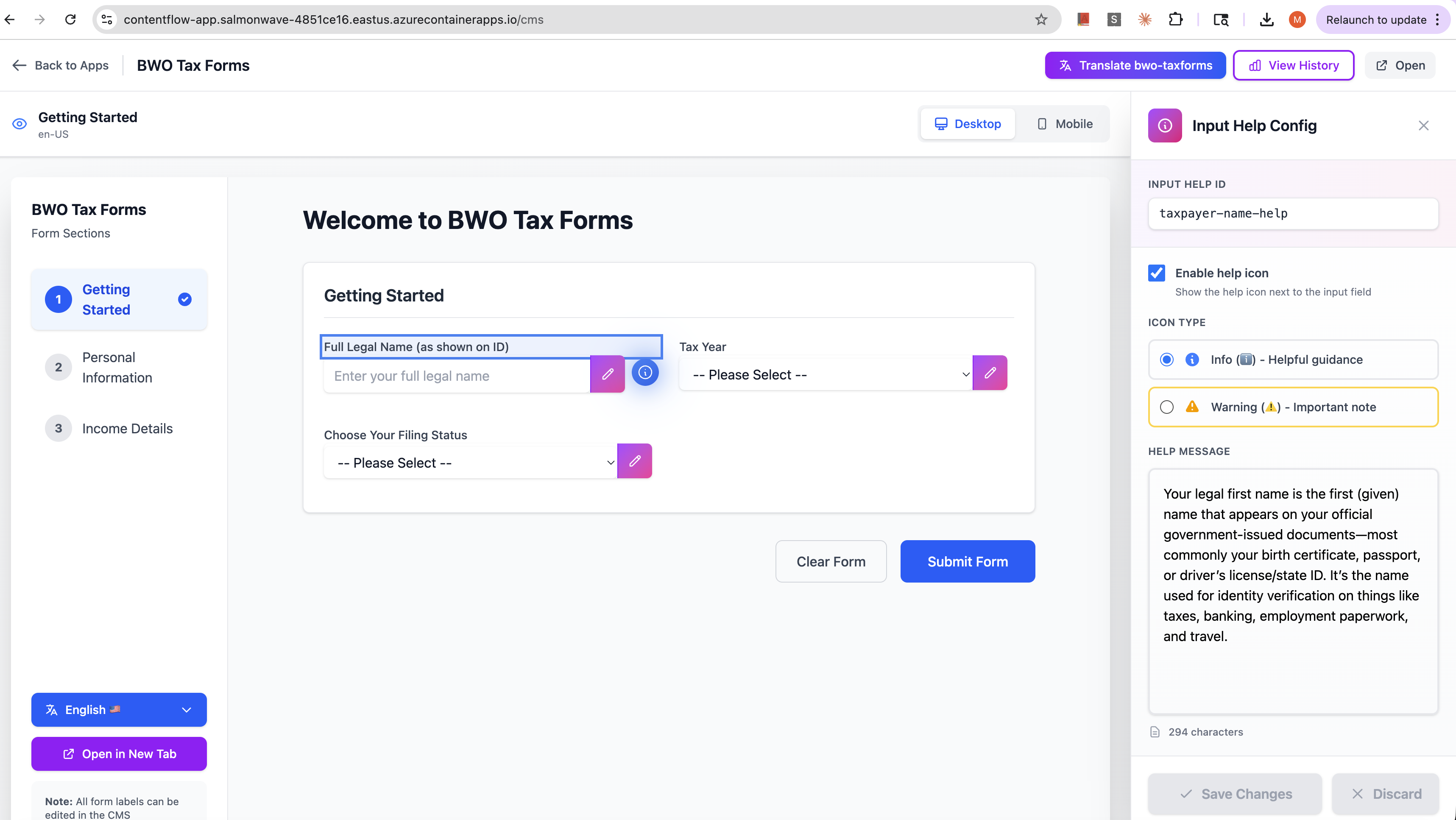
✅ Configurable Input Help
This was our latest feature—and it's a perfect example of the system's flexibility.
Product teams can now configure contextual help for form inputs:
- Enable/disable help icons per input
- Choose between info (ℹ️) or warning (⚠️) icons
- Write custom help messages
- Preview changes in real-time
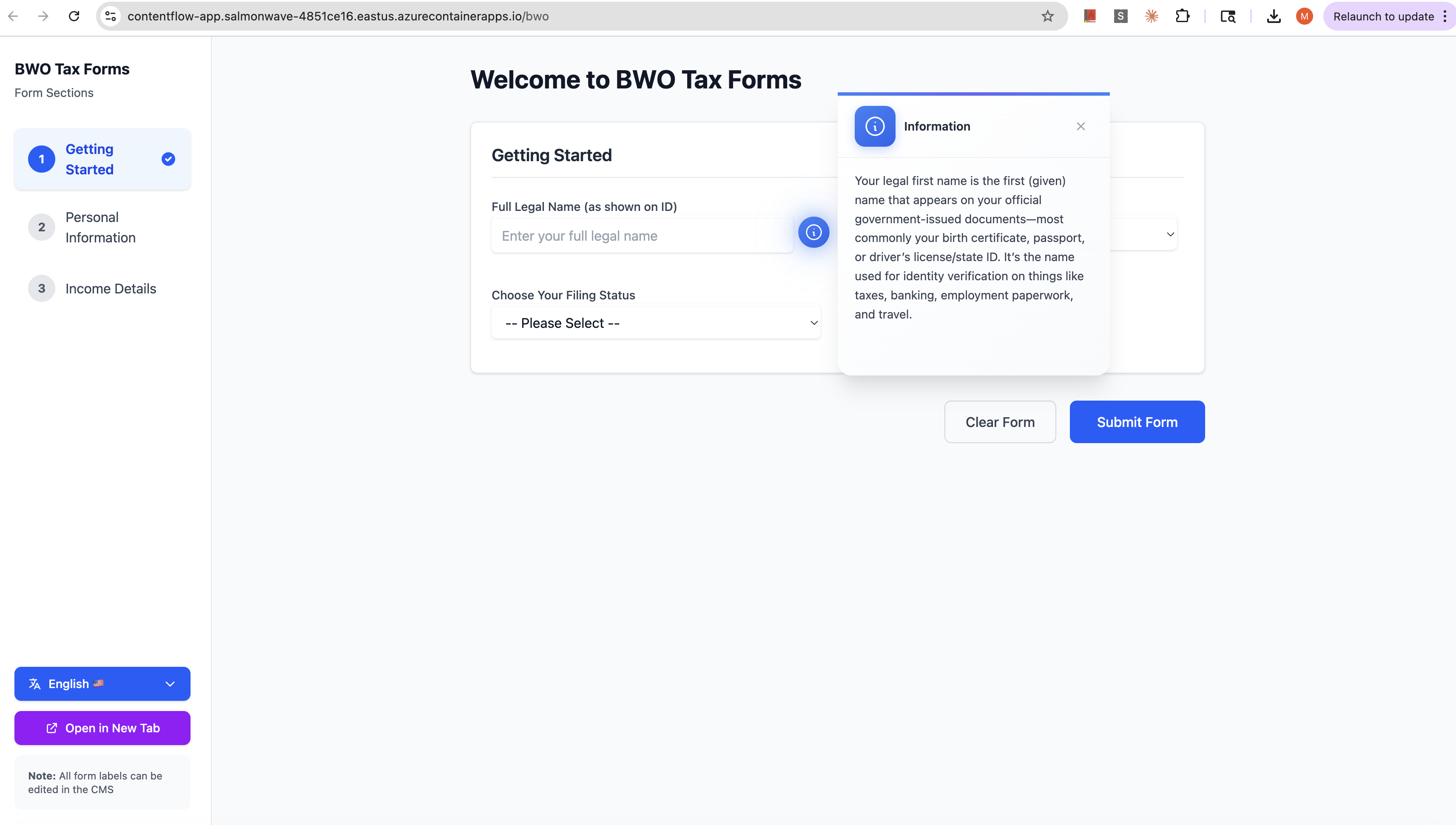
The magic? Input help uses the exact same content system as text. It's just another property in the JSON file. The SDK handles it automatically.
The UI? We made those help icons state-of-the-art:
- Glowing gradient backgrounds
- Smooth animations
- Modern card popups with scrollable content
- Attention-grabbing design for warnings
The AI Development Story: Built in 2 Days
Here's where things get really interesting.
I built this entire system—SDK, CMS, server, deployment infrastructure—in 2 days (32 working hours) using what I call Level 4 AI development.
What is Level 4?
AI maturity exists on a spectrum:
- Level 0: Autocomplete (code suggestions only)
- Level 1: AI Intern (small tasks, fully reviewed)
- Level 2: Junior Partner (meaningful code, guided)
- Level 3: Code Manager (generates most code, human guides) ⭐ RECOMMENDED
- Level 4: Requirement-Driven (implements full features from specs)
Level 4 means you write comprehensive specifications, and AI implements them. I spent 4 hours writing specs, and AI wrote 90% of the code in 28 hours.
The Development Flow
Day 1, Hours 1-4: Wrote detailed specs
- Spec 001: CMS system with user stories and acceptance criteria
- Spec 002: Unified deployment to Azure Container Apps
- Spec 003: AI translation with OpenAI Batch API
- Spec 004: Configurable input help
Day 1, Hours 5-12: AI implementation
- Generated SDK core with Zustand store
- Built CMS UI with React + Tailwind
- Created server with Bun + Express
- 90% of TypeScript/React code written by AI
Day 1, Hours 13-16: Testing and validation
- Fixed bugs (Type errors, edge cases)
- Validated Azure deployment setup
Day 2, Hours 1-16: Deployment and polish
- Pulumi infrastructure as code
- Azure Container Apps setup
- Multi-app routing configuration
- Production testing
What Made Level 4 Work
✅ Clear domain: CMS and content management are well-understood problems
✅ Comprehensive specs: Every user story had acceptance criteria, edge cases, and technical requirements
✅ Modular architecture: SDK, CMS, and Server are completely independent—no tight coupling
✅ Human-defined stack: I chose React, Bun, Azure, Pulumi, OpenAI upfront
✅ Phase-by-phase validation: Tested each component before moving to the next
✅ Data models first: API contracts and storage format defined before any coding
When Level 4 Works vs. Fails
✅ Level 4 Works:
- Greenfield projects with clear scope
- Well-defined problem domains
- Modular, loosely-coupled architecture
- Specs with comprehensive edge cases
- Human architect defines contracts
❌ Level 4 Fails:
- Legacy codebases with unclear architecture
- Tight coupling between components
- Ambiguous or changing requirements
- Complex domain logic requiring expertise
- Security/compliance-critical systems
The Development Methodology: Spec-Kit
I followed a structured approach I call "Spec-Kit":
/speckit.specify  → Create feature spec with user stories (1 hour)
       ↓
/speckit.plan    → Generate technical implementation plan (30 min)
       ↓
/speckit.tasks   → Break plan into 30-40 actionable tasks (30 min)
       ↓
/speckit.implement → AI generates code from tasks (8-12 hours)
       ↓
Human Review & Test → Validate each phase before continuing
Each spec lives in specs/{###-feature-name}/:
- spec.md: User stories and acceptance criteria
- plan.md: Tech stack, architecture, file structure
- tasks.md: Actionable task breakdown
- data-model.md: Entities and relationships
- contracts/: API specifications
The key insight? AI excels at implementation when you nail the specification.
The Results: Production-Ready in 2 Days
Let me share the metrics:
Development Speed
- ⚡ 2 days total development time (vs 2-3 weeks manual)
- ⚡ 32 hours working time
- ⚡ 90% AI-generated code
- ⚡ Deployed to Azure on Day 2
System Performance
- ✅ 4 apps managed from single CMS
- ✅ 11 content files across 5 languages
- ✅ Zero performance overhead (native framework integration)
- ✅ Scale-to-zero hosting (0-3 replicas based on traffic)
Cost Comparison
| Solution | Monthly Cost | Performance | Development Time |
|---|---|---|---|
| Walkme/Pendo | $500-2000 | +2-5s page load | None (but expensive) |
| Manual Build | $5-7 Azure | No overhead | 2-3 weeks |
| ContentFlow | $5-7 Azure | No overhead | 2 days |
ROI: 99% cost savings + 10x faster development
The Learnings: What Worked, What Didn't
The Good: Spec-Kit Productivity
✅ Massive productivity gains when requirements are clear ✅ AI-generated code often production-ready for well-scoped problems ✅ Structured specs reduce ambiguity drastically ✅ Great for boilerplate and repetitive patterns
The Challenges: Model Fatigue
⚠️ Model "napping": Slow, lazy responses toward the end of long sessions ⚠️ Model "yawning": Repetitive, generic output as conversation grows ⚠️ Context pollution: Quality degrades with massive conversation history ⚠️ Random shortcuts: AI sometimes takes incomplete paths and resists fixes
How to Keep Models Sharp
- Small, focused tasks: Break work into chunks. Do one thing, review, move on.
- Fresh chat windows: Start new conversations regularly to clear context
- Switch models: Rotate between different AI models when quality drops
- Don't burn it out: Treat AI like a team member—give it clear specs, check in often
The Tech Stack: Modern & Efficient
- Frontend: React 18 + TypeScript + Tailwind CSS
- Runtime: Bun (3x faster cold starts than Node)
- Server: Express.js on Bun
- State: Zustand (lightweight, < 1KB)
- Build: Vite (fast, modern bundler)
- Infrastructure: Pulumi (TypeScript IaC)
- Hosting: Azure Container Apps (serverless containers)
- Storage: Azure Blob Storage + CDN
- AI: OpenAI Batch API (gpt-5.1, 50% cheaper)
Beyond the Code: The Vision
ContentFlow CMS isn't just about managing content. It's about empowering product teams while respecting developer time.
For Product Teams
- Edit content without filing tickets
- See changes instantly in live preview
- Translate to multiple languages with one click
- Configure help text for complex forms
- No technical knowledge required
For Developers
- Clean, framework-native integration
- No performance overhead
- No architecture compromise
- One-time SDK setup, zero maintenance
- Freedom to focus on features, not content updates
For Companies
- 99% cost savings vs third-party tools
- Better performance than manual content management
- Faster time-to-market for content changes
- Multi-language support with AI translation
- Self-hosted, no vendor lock-in
What's Next: The Roadmap
Phase 2: Production Hardening
- Real-time collaboration with conflict detection
- Content versioning and rollback
- Advanced translation workflows with human review
- Scheduled publishing
- A/B testing support
Phase 3: Enterprise Features
- Azure AD authentication
- Role-based access control (admin, editor, viewer)
- Audit logs and compliance tracking
- Multi-region deployment
- Custom CDN integration
Phase 4: Developer Experience
- CLI tool for content extraction
- VS Code extension for content IDs
- Automated accessibility checks
- Performance monitoring dashboard
- Open-source the SDK
The Bigger Picture: AI-Powered Development
Building ContentFlow taught me something profound about the future of software development.
We're entering an era where comprehensive specifications matter more than coding skill. The ability to clearly define requirements, edge cases, and acceptance criteria is becoming the bottleneck—not implementation speed.
Level 4 AI development works when:
- Problem domain is well-understood
- Requirements are comprehensive and stable
- Architecture is modular and well-defined
- Human architect defines contracts and data models
- Validation checkpoints exist at each phase
But the recommendation I give to every team? Start with Level 3.
Why Level 3 is Better for Most Projects
Level 3 (Code Manager) gives you the best of both worlds:
- Human defines "what" and "why" → AI generates "how"
- Faster iteration → No need for perfect specs upfront
- Better for exploration → Requirements emerge during development
- Real-time review → Human understands every line of code
- Easier debugging → Human maintains mental model of the system
Use Level 4 selectively for:
- Greenfield projects with crystal-clear scope
- Well-documented problem spaces
- Tight deadlines with familiar domains
- Boilerplate-heavy work (CRUD, forms, configs)
Final Thoughts: Build the Future You Want
ContentFlow CMS represents a philosophy: technology should serve people, not constrain them.
Product teams shouldn't need to file tickets for typo fixes. Developers shouldn't waste time on content updates. Companies shouldn't pay thousands per month for slow, bloated third-party tools.
The solution? Build native. Build modular. Build with modern tools. And when appropriate, leverage AI to move 10x faster.
This project took 2 days from idea to production deployment. It costs $7/month to run. It delivers better performance than tools costing $2,000/month. It empowers product teams while respecting developer time.
And it proves that with the right architecture, the right tools, and the right AI-assisted workflow, small teams can build big solutions.
Try It Yourself
The vision is clear. The code is production-ready. The cost is negligible.
https://contentflow-app.salmonwave-4851ce16.eastus.azurecontainerapps.io/cms
If you're building web applications and struggling with content management, third-party tool bloat, or manual translation workflows—consider this approach.
Build a common library. Integrate natively. Empower your product teams. Ship faster.
And maybe, just maybe, use AI to get there 10x faster than you thought possible.
Tech Stack: React • TypeScript • Bun • Azure Container Apps • Pulumi • OpenAI Batch API Development Time: 2 days (32 hours) Cost: $5-7/month hosting + $0.50/month AI translation Performance: Zero overhead vs +2-5s for third-party tools ROI: 99% cost savings + native framework integration
Status: ✅ Production-deployed on Azure Blog: Madhudream.dev/contentflow-cms Demo: contentflow-demo.azurecontainerapps.io
Built with AI assistance using Level 4 development methodology. 90% of code AI-generated from comprehensive specifications. Architecture, specifications, and validation by human engineer.