The Problem I Wanted to Solve
I've always loved learning new words. Whether it's stumbling upon an interesting term while reading, or hearing someone use a word I've never encountered before, I wanted a simple way to capture and remember these vocabulary gems.
You know that moment when you're reading on your phone and come across a word you don't know? You could switch apps, look it up, maybe save it somewhere... but honestly, it's too much friction. By the time you get back to reading, you've lost your flow.
I wanted something faster. Something that just works.
The problem with existing vocabulary apps:
- Too much manual work: You have to type the word, search for definitions, copy examples
- Slow workflow: Multiple steps break your reading flow
- No AI assistance: Definitions are basic, examples are generic
- Poor pronunciation support: Phonetic symbols are confusing
- No quick review: Flash cards are buried in menus
I knew there had to be a better way.
The Vision: Instant Vocabulary Capture
The core idea behind WordStash was simple but powerful: capturing words should take seconds, not minutes.
Instead of a 5-step process to add a word, WordStash reduces it to:
- Copy the word
- Open the app
- Tap the clipboard button
- Done
Everything else happens automatically using AI.
For Readers
- See a word → Copy it → Add to WordStash → Back to reading in 3 seconds
- No typing, no searching, no manual definition entry
- AI fetches meaning and usage examples instantly
- Pronunciation with one tap (no phonetic symbols needed)
For Students
- Build your vocabulary list effortlessly
- Review with swipeable flash cards
- Filter by starred words for exam prep
- Cloud sync across all devices
How It Works
WordStash is built around one simple workflow:
The 3-Second Add Flow
- See a new word while reading (anywhere on your phone)
- Copy it (standard iOS copy)
- Open WordStash and tap the clipboard button
- Done (definition appears instantly)
The app automatically:
- Fetches the meaning using OpenAI's API
- Generates real-world usage examples
- Provides accurate pronunciation
- Saves to your cloud-synced collection
- Makes it available for flash card review
The Smart Features
AI-Powered Definitions: Every word gets contextually accurate definitions and multiple usage examples. The AI understands nuance and provides explanations that make sense.
Instant Pronunciation: No phonetic symbols like /ˈfəʊnətɪk/. Just tap the speaker icon and hear the word pronounced correctly using iOS's text-to-speech (works offline, multiple languages).
Smart Flash Cards: Swipeable cards with smooth animations. Filter by starred words for focused study. Track your learning progress.
Cloud Sync: Built with Supabase for real-time sync. Add a word on iPhone, review on iPad—everything stays synchronized.
The Features: What I Built
✅ AI-Powered Definitions
Every word you add gets an automatic definition and real-world usage examples. I integrated OpenAI's API to make this happen, and the results are impressively accurate.
Example:
- Word: "Ephemeral"
- Definition: "Lasting for a very short time; temporary or short-lived"
- Usage: "The ephemeral beauty of cherry blossoms makes their brief blooming season even more special"
✅ Pronunciation Made Easy
Tap the speaker icon next to any word and hear how it's pronounced. No need for phonetic symbols – just tap and listen. This uses iOS's built-in text-to-speech (AVSpeechSynthesizer), so it:
- Works offline
- Supports multiple languages
- Uses natural-sounding voices
- Adjusts speech rate for clarity
✅ Flash Cards for Review
Learning words is one thing, remembering them is another. I added swipeable flash cards with smooth flip animations:
- Swipe through your collection
- Tap to flip and reveal definitions
- Star important words
- Filter to review just starred words
- Perfect for exam prep or focused study sessions
✅ Cloud Sync
Your vocabulary collection syncs across all your devices using Supabase:
- Real-time synchronization
- Works offline, syncs when reconnected
- Secure authentication
- No data loss
- Start on iPhone, continue on iPad
✅ Beautiful Design
I went for a clean, modern interface inspired by iOS design guidelines:
- Glassmorphic cards with subtle blur effects
- Smooth animations and transitions
- Card-based layout for easy scanning
- Adaptive colors that work in light and dark mode
- No clutter, just your words and their meanings
✅ Quick Actions
- Clipboard Button: One-tap add from clipboard
- Manual Entry: Type words when needed
- Star Words: Mark favorites for priority review
- Delete/Edit: Manage your collection easily
- Search: Find words instantly across your entire collection
The Architecture: SwiftUI + Cloud
WordStash follows modern iOS architecture patterns:
1. SwiftUI Interface
Modern, declarative UI framework for iOS 17+:
- Smooth animations with built-in transitions
- Native iOS components (Lists, NavigationStack, Sheets)
- Adaptive layouts for iPhone and iPad
- Dark mode support automatically
2. SwiftData Local Storage
Apple's new persistence framework (iOS 17):
- Type-safe data models
- Automatic cloud sync with CloudKit
- Efficient querying with predicates
- Seamless migration and versioning
3. Supabase Cloud Backend
Modern PostgreSQL backend with real-time capabilities:
- Row-level security for data protection
- Real-time subscriptions for instant sync
- Built-in authentication (email, OAuth)
- RESTful API with automatic TypeScript types
4. OpenAI Integration
GPT-4 for intelligent definitions:
- Contextual understanding of words
- Multiple usage examples
- Handles slang, technical terms, idioms
- Cost-effective with batching (~$0.001 per word)
The Tech Stack
For fellow developers curious about what's under the hood:
- SwiftUI: Declarative UI framework (iOS 17+)
- SwiftData: Local persistence and data modeling
- Supabase: Authentication and cloud database (PostgreSQL)
- OpenAI API: AI-generated definitions and examples (GPT-4)
- AVSpeechSynthesizer: Text-to-speech for pronunciation (built-in iOS)
- Combine: Reactive programming for data flow
- Swift Concurrency: async/await for network calls
Development Environment:
- Xcode 15+
- iOS 17+ deployment target
- Swift 5.9+
The User Experience: Speed & Simplicity
The Reading Flow (No Interruption)
Reading article on Safari
    ↓
See unfamiliar word: "serendipity"
    ↓
Long-press → Copy
    ↓
Switch to WordStash (1 sec)
    ↓
Tap clipboard button (1 sec)
    ↓
Definition appears with AI-generated examples (1 sec)
    ↓
Switch back to Safari (1 sec)
    ↓
Total time: 3-4 seconds
The Review Flow (Focused Learning)
Open WordStash
    ↓
Navigate to Flash Cards
    ↓
Filter by "Starred" (exam prep mode)
    ↓
Swipe through cards
    ↓
Tap to flip and test yourself
    ↓
Star difficult words for re-review
Who It's For
WordStash is perfect if you:
📚 Avid Readers
- Encounter new words regularly in books, articles, blogs
- Want to retain and remember interesting vocabulary
- Prefer seamless integration with reading flow
🎓 Students
- Studying for standardized tests (SAT, GRE, TOEFL, IELTS)
- Building academic vocabulary
- Need efficient review tools (flash cards, starred words)
- Want to track learning progress
💼 Professionals
- Improving professional vocabulary
- Reading industry-specific content
- Communicating more effectively
- Staying sharp with continuous learning
🌍 English Learners
- Learning English as a second language
- Building practical vocabulary
- Need pronunciation help
- Want real-world usage examples
🧠 Word Enthusiasts
- Love learning new words
- Enjoy expanding vocabulary
- Appreciate elegant language
- Like collecting interesting terms
What's Next: The Roadmap
This is version 1.0, and I have exciting features planned:
Phase 2: Smart Learning
- Spaced repetition algorithm: Review words at optimal intervals
- Progress tracking: Visualize your vocabulary growth
- Learning streaks: Stay motivated with daily goals
- Mastery levels: Track which words you've truly learned
Phase 3: Enhanced Features
- Widget support: "Word of the day" on your home screen
- Export functionality: Download your vocabulary as CSV/PDF
- Word families: See related words (synonyms, antonyms, derivatives)
- Etymology: Learn word origins and historical usage
Phase 4: Customization
- Custom themes: Choose colors that match your style
- Card layouts: Multiple flash card designs
- Categories: Organize words by topic (business, literature, etc.)
- Import from reading apps: Auto-detect highlighted words
Phase 5: Social & Sharing
- Shared collections: Study with friends
- Public word lists: Explore curated vocabularies
- Achievements: Badges for milestones
- Challenge mode: Compete with yourself or friends
Final Thoughts: Build Your Vocabulary Effortlessly
WordStash represents a philosophy: learning should be frictionless.
You shouldn't need to break your reading flow to look up a word. You shouldn't need to manually type definitions. You shouldn't struggle with phonetic symbols to learn pronunciation.
The solution? Use AI to eliminate friction. Use native iOS features for seamless integration. Build a beautiful, fast interface that respects your time.
This app is my daily companion for building vocabulary. Every interesting word I encounter goes straight into WordStash. Within seconds, I have the definition, examples, and pronunciation—all without breaking my reading flow.
And now it can be yours too.
Try It Yourself
WordStash is available on the Testflight. Please email me at madhured@gmail.com, happy to take your feedback. I am working to get approval to get it avaialble for every one on App Store.
Whether you're a student, professional, avid reader, or just someone who loves words like I do, I hope WordStash becomes your go-to tool for building an impressive vocabulary.
🔗 Download on App Store: [Coming Soon]
Questions? Feedback? Reach me at madhu@madhudream.dev
Tech Stack: SwiftUI • SwiftData • Supabase • OpenAI API • AVSpeechSynthesizer Platform: iOS 17+ Languages: Swift 5.9+ Features: AI definitions • Cloud sync • Flash cards • Pronunciation
Status: ✅ Version 1.0 Released Blog: Madhudream.dev/wordstash Download: App Store (Coming Soon)
Screenshots Gallery
Screenshot 1: Main Word List
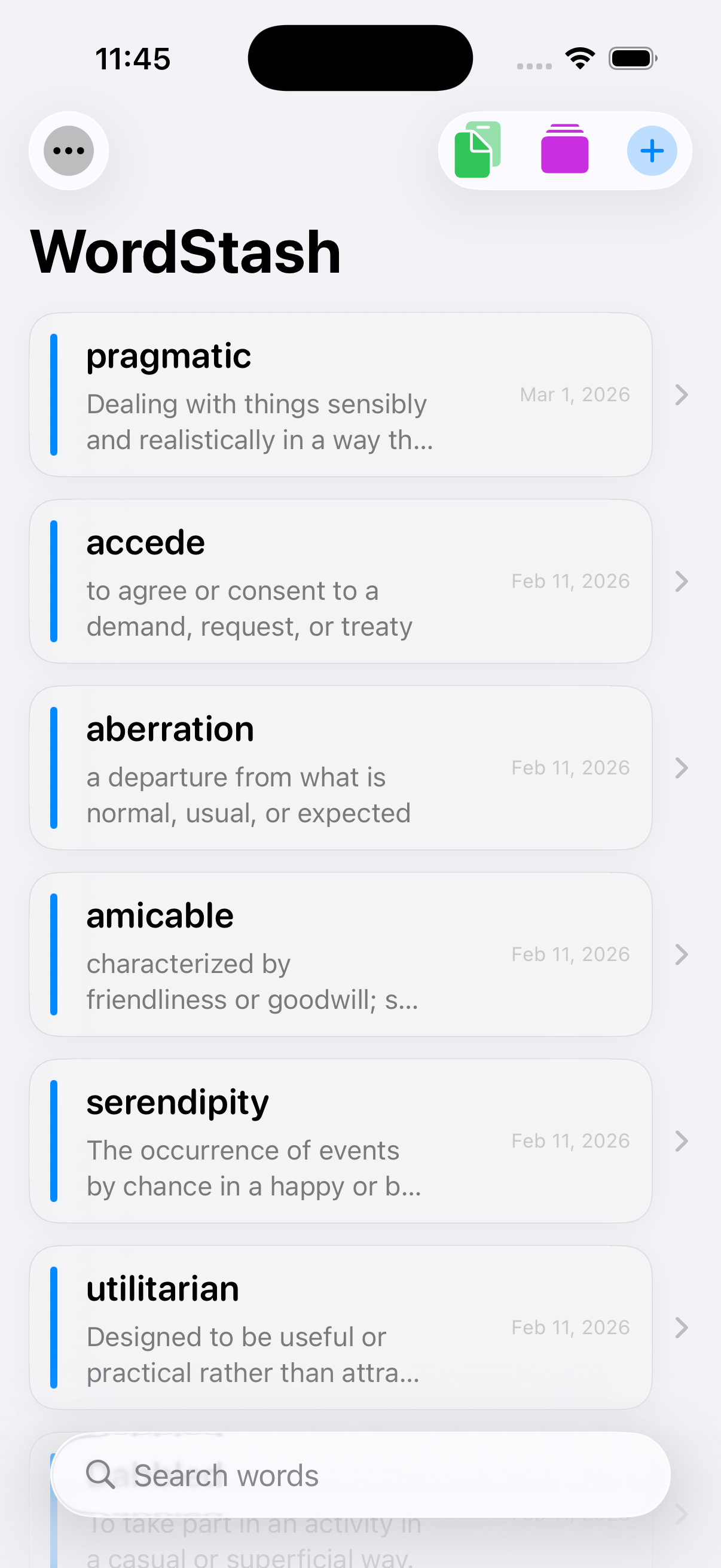 Your vocabulary collection at a glance - clean card-based layout with word, definition, and quick actions
Screenshot 2: Word Detail View
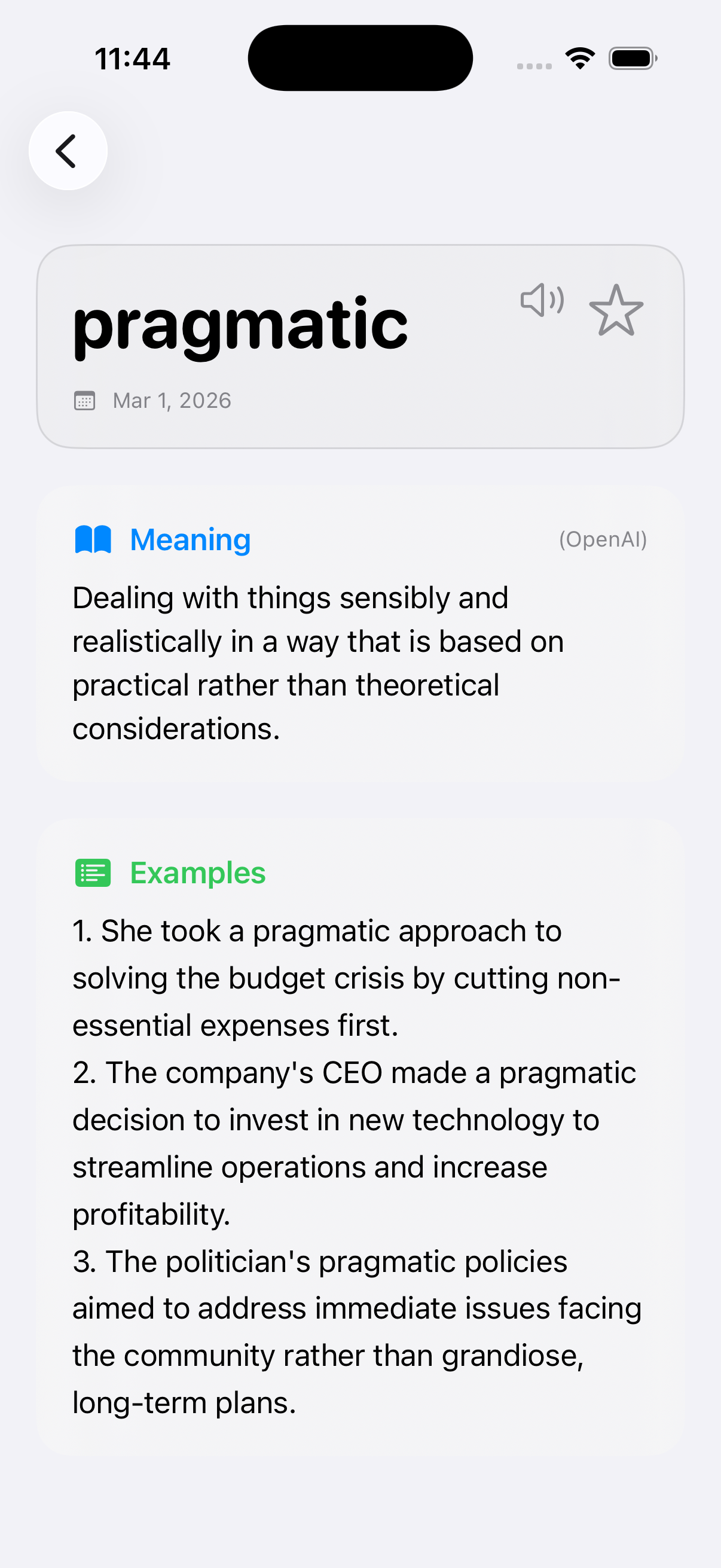 AI-generated definition with pronunciation button and usage examples
Screenshot 3: Add Word from Clipboard
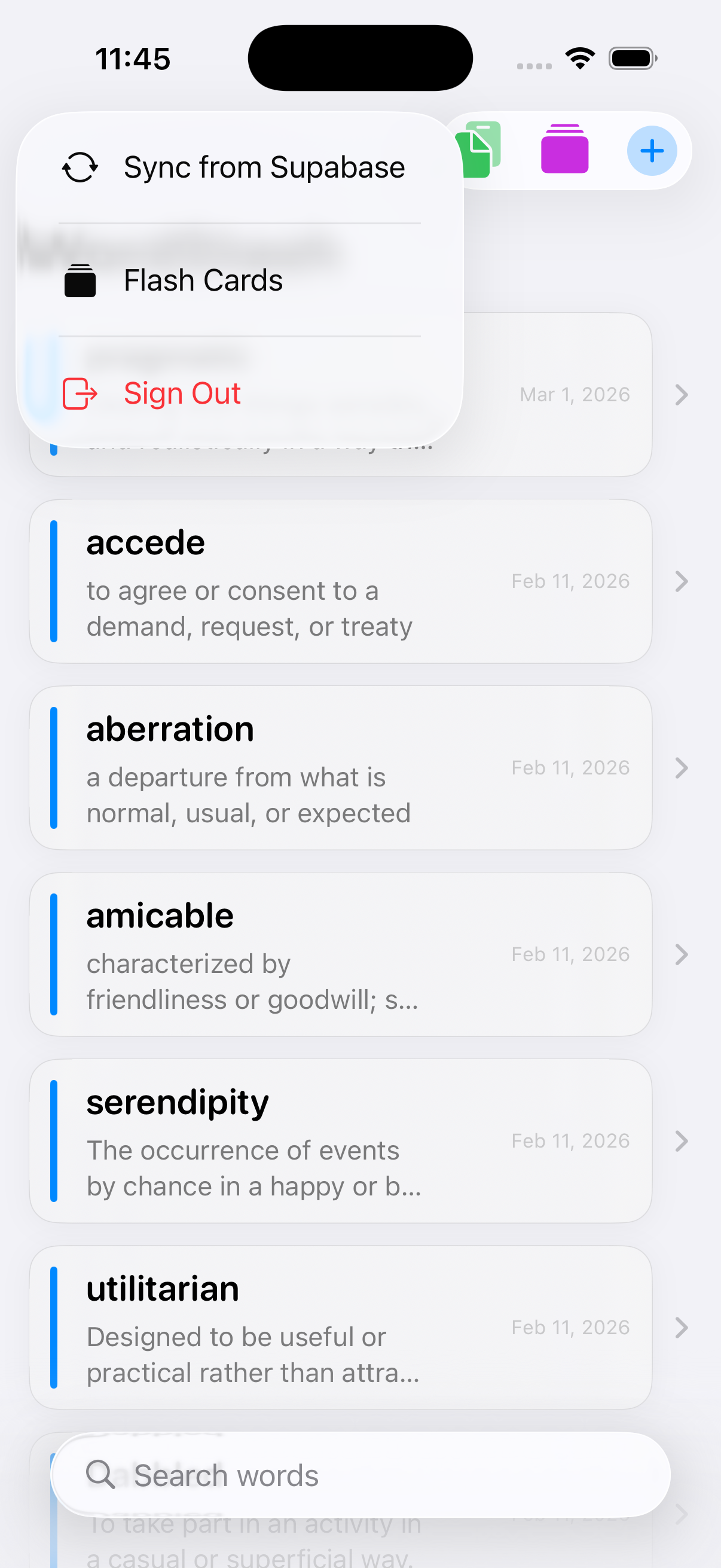 One-tap add from clipboard - the fastest way to capture new words while reading
Screenshot 4: Flash Cards Mode
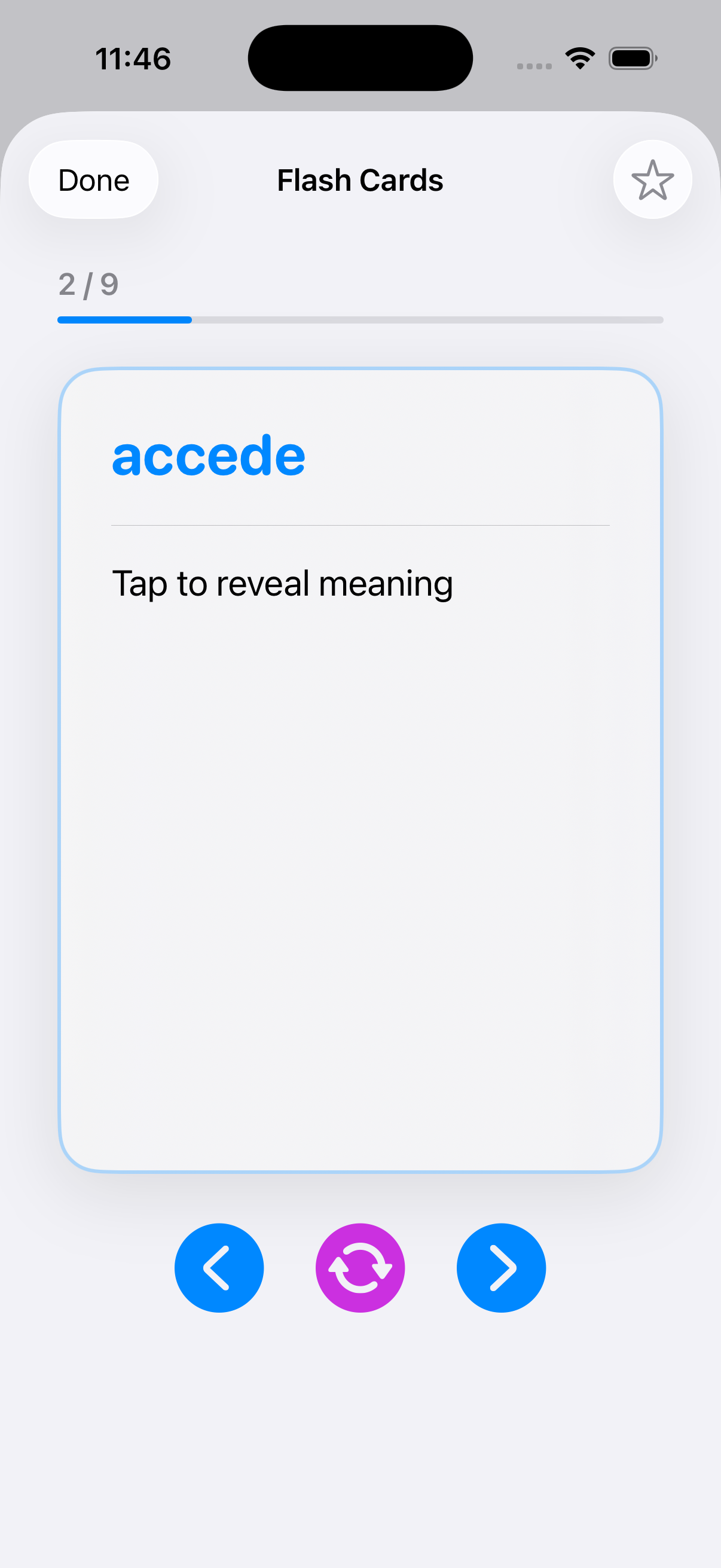 Swipeable flash cards with smooth animations - perfect for study sessions
Screenshot 5: Starred Words Filter
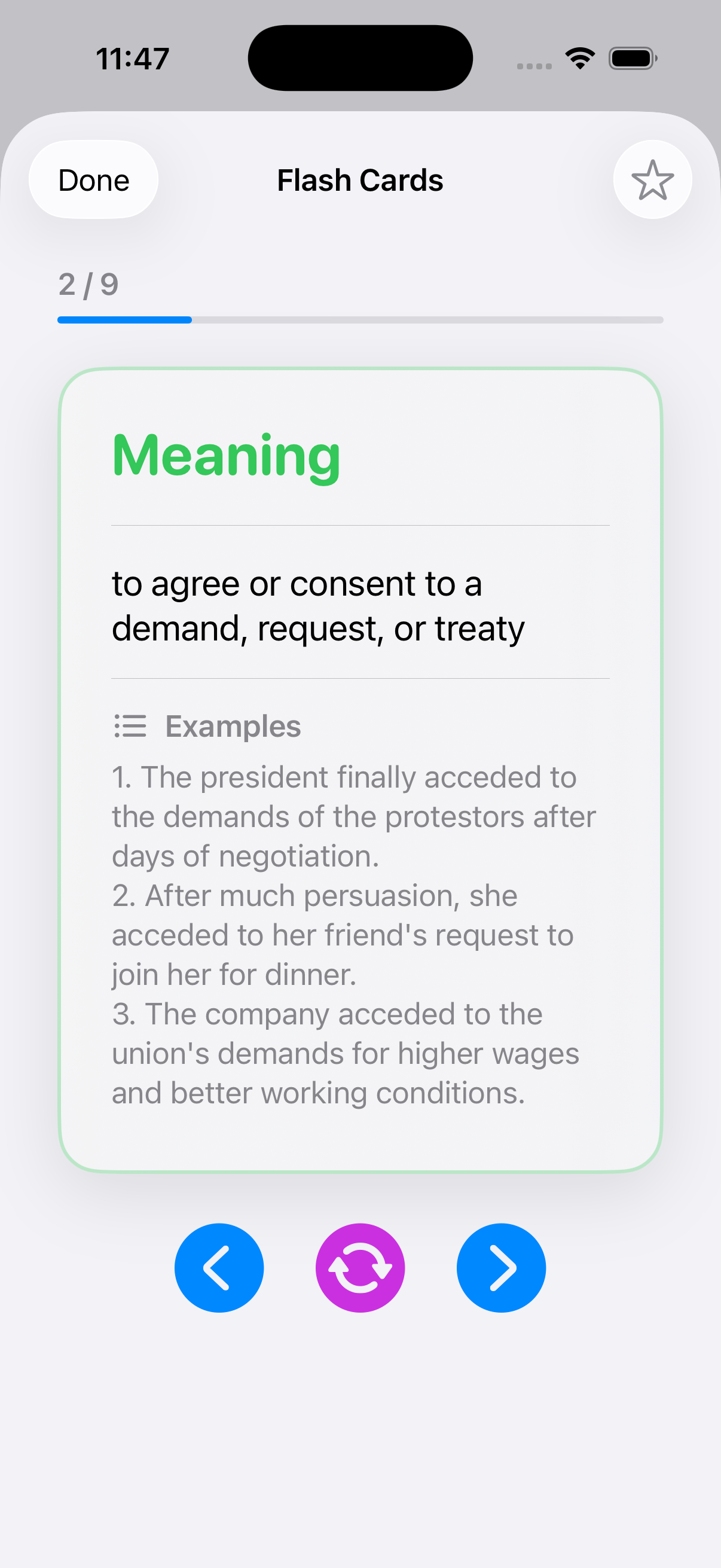 Filter by starred words for focused exam prep and priority review
Built with SwiftUI and modern iOS development practices. AI-powered definitions using OpenAI GPT-4. Cloud sync with Supabase PostgreSQL backend.
P.S. – Every word in this post was one I already knew, but if I encountered a new one while writing, you bet I would've added it to WordStash! 😊