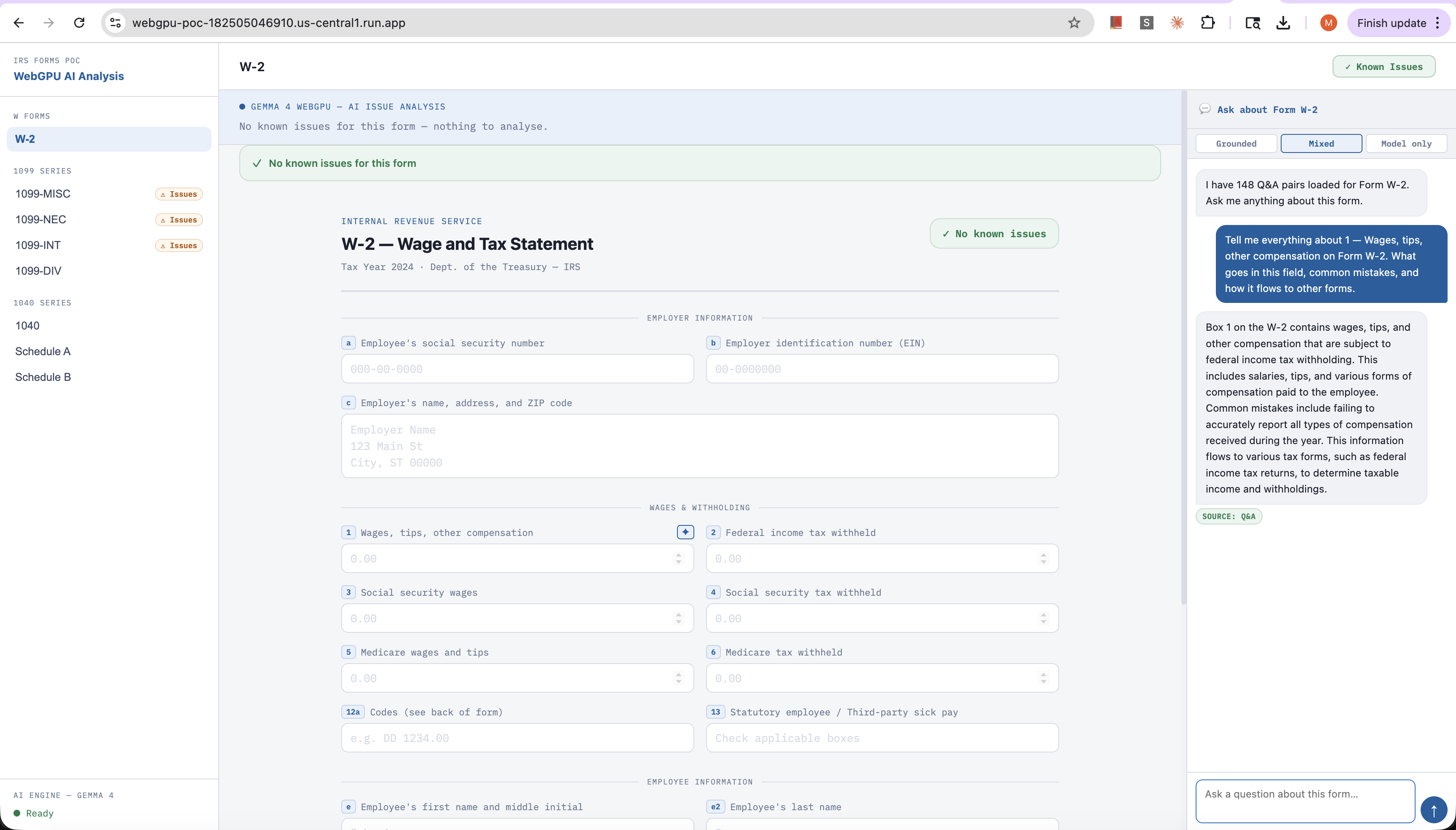
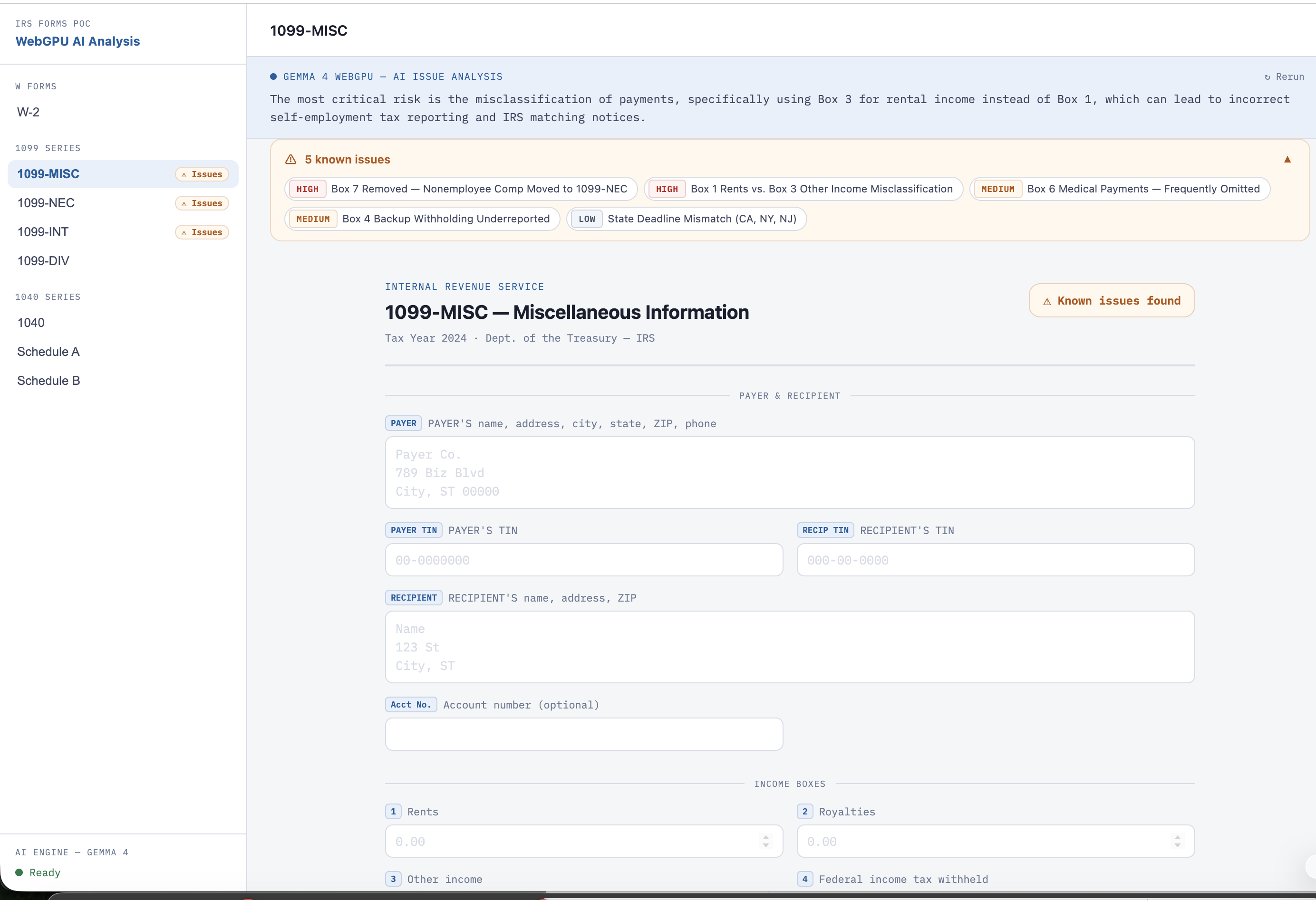
Live demo (tax prep proof-of-concept): webgpu-poc-182505046910.us-central1.run.app · GitHub: madhudream/webgpu-gemma4-tax
72 hours. Zero sleep. One working demo. A Gemma 4 LLM running live inference inside a browser tab — no internet required after the first load, no server, no API key, no per-query cost. The proof-of-concept is tax prep. The pattern works for any domain.
The Idea — The Credit Wall Problem
You've seen the screen. You open an app, tap the AI feature, and you get:
0 / 3 credits available. Upgrade to continue.
Maybe it's a writing assistant. A coding helper. A customer support bot. A document analyser. A language tutor. A recipe suggester. Doesn't matter — the UI is always the same. You used your free tokens, and now the app is asking you to buy more.
This isn't an accident. It's the business model. Every AI feature in every SaaS app today is a thin wrapper around a cloud API that charges per token. The app developer pays per query, passes the cost on as "credits", and the user hits a wall the moment the feature becomes genuinely useful.
The credit wall is everywhere:
- Notion AI — runs out mid-document
- Grammarly — premium features gated behind a subscription that's really just a token budget
- Canva AI — "You've used your monthly AI generations"
- GitHub Copilot — per-seat billing for what is fundamentally token consumption
- Every domain-specific app built on top of OpenAI/Anthropic/Gemini API
And the irony is: most of these apps answer the same bounded set of questions, from the same finite knowledge base, over and over. The knowledge doesn't change. The model doesn't need to be a frontier model like OpenAI or Claude. But every query still routes to a cloud API, burns tokens, and sends user data to a third-party server.
What if the credits never ran out — because the model was running locally, on the user's own GPU, with zero per-query cost?
That's the question this project answers.
I wanted to answer one question: what if the model ran in the browser, with the knowledge injected locally? On the user's own GPU. Zero server, zero tokens, zero per-query cost. Data never leaves the device.
That's not a new idea — WebLLM, Transformers.js, and the broader WebGPU ecosystem point in this direction. What was missing was:
- A model small enough to load in a browser tab without a $3,000 GPU
- A practical data pipeline to show the pattern working end-to-end on real domain knowledge
Gemma 4 solved problem 1 with two architectural innovations: TurboQuant and Per-Layer Embeddings (PLE). I built the proof-of-concept on problem 2 using IRS tax data — 3,088 PDFs, filtered and converted into 20,000 Q&A pairs.
The proof-of-concept is tax prep. The deployment pattern works for any domain.
By the Numbers
| Metric | Value |
|---|---|
| Total build time | ~72 hours |
| IRS PDFs scraped | 3,088 |
| PDFs after filtering | 1,421 |
| Q&A training pairs generated | ~20,000 |
| Fine-tuning data pipeline cost | ~$5 (Claude API) |
| Per-query inference cost | $0.00 |
| Model size (quantized) | ~600 MB |
| Deployment | Static HTML + nginx + Cloud Run |
Why Gemma 4 Fits in a Browser: TurboQuant + PLE
Before we get to the build, we need to understand why this is even possible in 2025 when it wasn't in 2023. Two architectural innovations in Gemma 4 are the reason: TurboQuant and Per-Layer Embeddings (PLE). Without them, fitting a capable LLM into a browser tab would require either a very small, dim model or a $3,000 desktop GPU.
TurboQuant — Two-Step Compression
Standard quantization compresses a model by reducing weight precision (e.g., 32-bit floats → 8-bit integers). TurboQuant goes further with a two-stage approach that gets dramatically better compression with less quality loss.
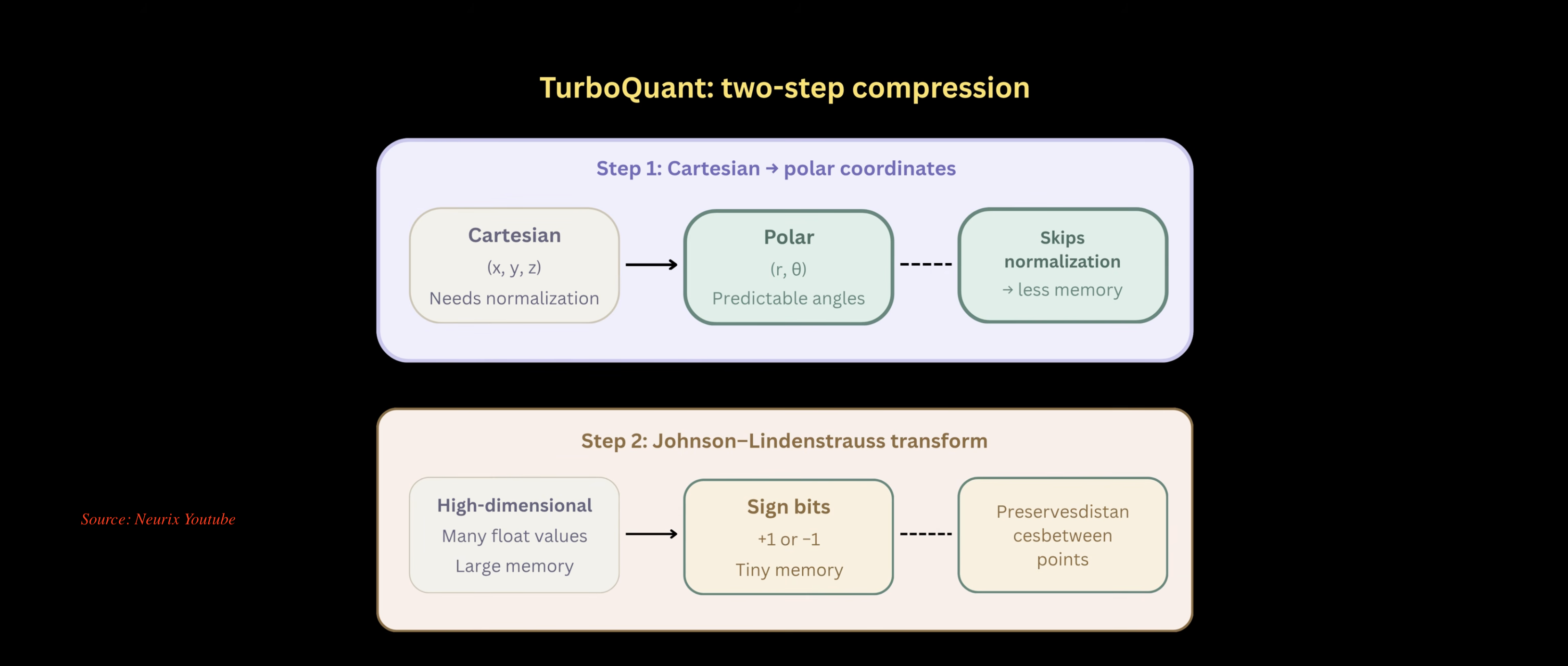
Step 1 — Cartesian → Polar coordinates
Model weights are normally stored as $(x, y, z)$ Cartesian coordinates. Converting to polar $(r, \theta)$ representation means the angles become highly predictable and regular. The critical side-effect: normalization can be skipped, which sheds a significant chunk of memory overhead.
$$\text{Cartesian}(x, y, z) \xrightarrow{\text{TurboQuant Step 1}} \text{Polar}(r, \theta) \text{ — skips normalization}$$
Step 2 — Johnson–Lindenstrauss transform
The polar-converted weights are then projected through a Johnson–Lindenstrauss (JL) transform. The JL lemma guarantees that you can reduce high-dimensional data to sign bits (+1 or −1) while preserving the relative distances between points. Think of it as flattening a complex weight landscape down to a binary map that still captures all the meaningful relationships.
$$\text{High-dim floats} \xrightarrow{\text{JL transform}} \text{Sign bits} \{+1, -1\} \text{ — tiny memory, distances preserved}$$
The combined result: a ~600 MB quantized model (q4f16) that fits comfortably in the VRAM of an integrated GPU — the kind found in any mid-range laptop made after 2022.
q4f16 in plain English: 4-bit integer weights (TurboQuant-compressed) + 16-bit float activations. A model that would occupy 2.4 GB at full fp32 precision runs in ~600 MB. That's the difference between "needs a dedicated GPU" and "runs in a browser tab."
PLE — Per-Layer Embeddings
The second innovation addresses model quality at small sizes. Traditional small models inject all context into the token stream at the start and carry it through every layer. Per-Layer Embeddings take a smarter approach.
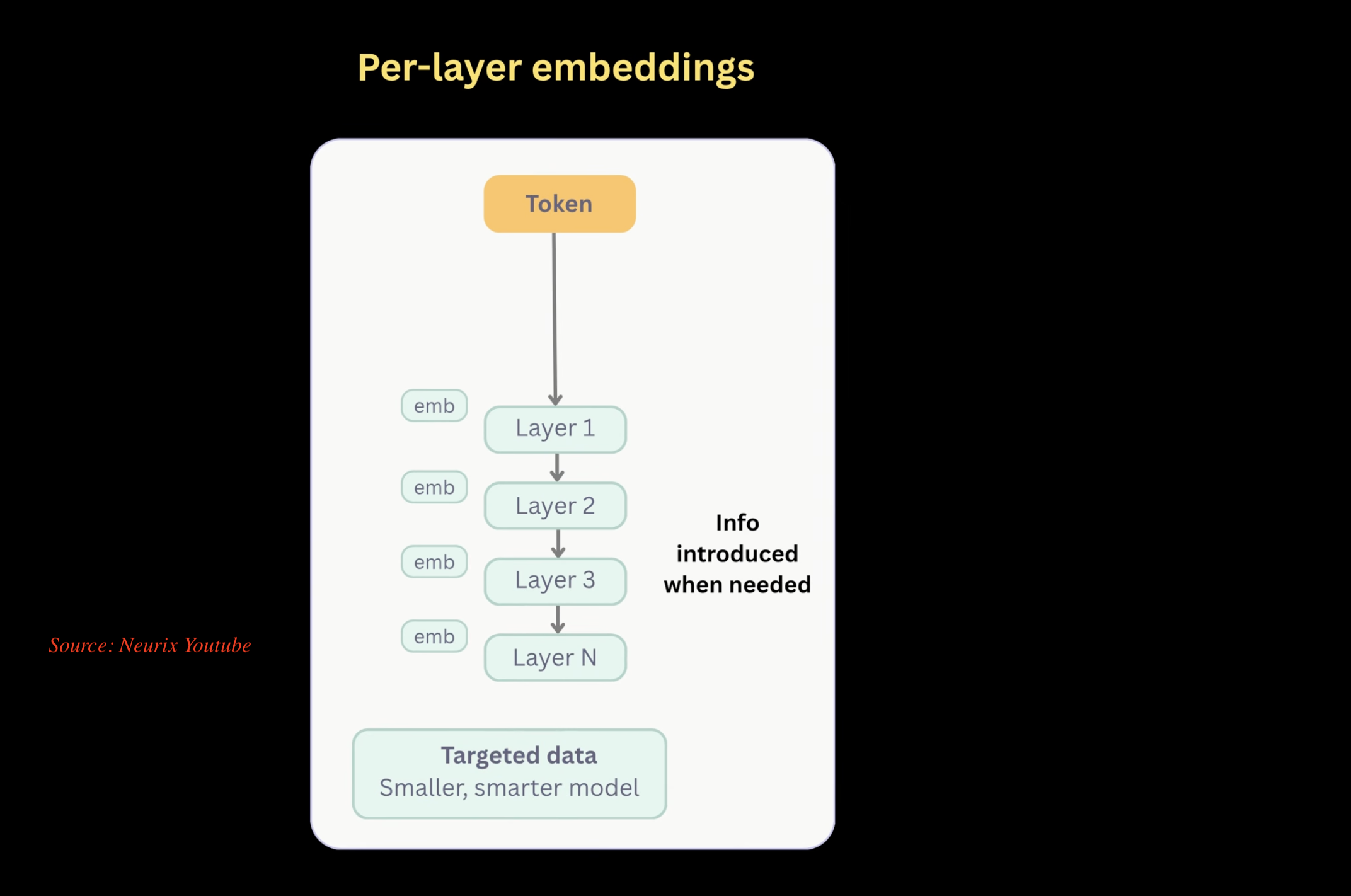
(Source: Neurix YouTube)
The Neurix channel has an excellent deep-dive on Gemma 4's architecture that covers both TurboQuant and PLE in detail — worth watching before diving into the code:
Instead of front-loading all embeddings, PLE introduces domain-specific information at each layer, only when that layer needs it. A token flows through Layer 1 → Layer 2 → Layer 3 → Layer N, and at each transition the model receives a fresh embedding injection targeted to that depth of reasoning.
The result: the same model parameters carry far more task-relevant signal per byte. You get:
- Smaller overall model — fewer parameters needed to achieve the same accuracy
- Smarter per-domain performance — embeddings are targeted to the task, not generic
- Better VRAM efficiency — context doesn't need to be propagated through the full weight stack from Layer 1
How They Work Together
| Property | Without TurboQuant + PLE | With TurboQuant + PLE |
|---|---|---|
| Model size at capability | 3–7 GB | ~600 MB |
| Quality at 600 MB | Poor | Production-usable |
| VRAM requirement | Dedicated GPU | Integrated GPU / browser |
| Load time (cached) | N/A | < 1 second |
| Per-query cost | API tokens | $0.00 |
This is why the browser runtime is viable in 2025. Not because browsers got faster (they did), and not because WebGPU is new (it isn't) — but because Gemma 4's compression architecture crossed the threshold where "browser GPU" became a real inference target.
The deployment pattern is:
- Load the ONNX model once → cached in IndexedDB
- Inject domain knowledge via RAG at inference time (or fine-tune it in permanently)
- Run unlimited queries locally — no server, no token counter, no data leaving the device
Tax prep is the proof-of-concept. Swap the IRS Q&A for medical billing codes, HR policies, legal precedents, product specs — the architecture is identical.
4 a.m. on April 13 — The POC
The first question was binary: does this actually work as a real deployment pattern? Can you load Gemma 4 in a browser tab via Transformers.js, inject domain Q&A at runtime, and get coherent answers — all without a server?
The answer, using the onnx-community/gemma-4-E2B-it-ONNX model on Hugging Face and Transformers.js: yes. And the tax prep demo is the thing I built to prove it.
// ai.js — the heart of the browser runtime
const MODEL_ID = 'onnx-community/gemma-4-E2B-it-ONNX';
const CDN      = 'https://cdn.jsdelivr.net/npm/@huggingface/transformers@4.0.1';

export async function loadModel() {
  const { AutoProcessor, Gemma4ForConditionalGeneration, TextStreamer } =
    await import(CDN);

  aiProcessor = await AutoProcessor.from_pretrained(MODEL_ID);

  aiModel = await Gemma4ForConditionalGeneration.from_pretrained(MODEL_ID, {
    dtype: 'q4f16',   // 4-bit integer + 16-bit float — small enough to fit in VRAM
    device: 'webgpu', // hands it off to the browser's GPU pipeline
    progress_callback: (info) => {
      if (info.status === 'progress') emit('loading', `Downloading… ${info.progress}%`);
    },
  });
}
The model loads once, lives in the browser's IndexedDB cache, and on every subsequent visit it starts cold in under a second from disk. The q4f16 dtype is the sweet spot — small enough that a mid-range laptop GPU handles it without sweating, sharp enough to give coherent answers.
Why q4f16 works here: TurboQuant's two-step compression (Cartesian→polar + Johnson–Lindenstrauss) gets Gemma 4 down to ~600 MB at this dtype — small enough for an integrated GPU, sharp enough for production answers. See the full explanation above.
That first morning proved the runtime was viable. Now came the hard part: what does the model actually know about taxes?
The Data Pipeline — Scraping the IRS
If you want a model that knows about IRS forms, you need IRS forms. The official source is https://www.irs.gov/forms-instructions-and-publications — a paginated table with 124 pages and 3,088 rows.
Playwright got me every single one:
// scrape_irs_pdfs.js
const BASE_URL = 'https://www.irs.gov/forms-instructions-and-publications';
const LAST_PAGE = 123; // page=0 to page=123 → 124 pages × 25 = 3,088 actual rows

async function scrapePage(page, pageIndex) {
  const url = pageIndex === 0 ? BASE_URL : `${BASE_URL}?page=${pageIndex}`;
  await page.goto(url, { waitUntil: 'domcontentloaded', timeout: 60000 });
  await page.waitForSelector('table tbody tr', { timeout: 30000 });

  return await page.$$eval('table tbody tr', (trs) =>
    trs.map((tr) => {
      const linkEl = tr.querySelector('a[href*=".pdf"]');
      return {
        formNumber: tr.querySelectorAll('td')[0]?.innerText?.trim() || '',
        title:      tr.querySelectorAll('td')[1]?.innerText?.trim() || '',
        period:     tr.querySelectorAll('td')[2]?.innerText?.trim() || '',
        pdfUrl:     linkEl ? linkEl.href : null,
      };
    }).filter(Boolean)
  );
}
3,088 rows. One JSON file. The raw IRS catalog, scraped in about 20 minutes.
Filtering 3,088 PDFs with Claude
Raw IRS data is messy. 3,088 entries include Spanish-language duplicates, Haitian Creole editions, Korean versions, obsolete forms, IRS internal procedural manuals, blank envelope templates, and statistics-of-income reports — none of which help a taxpayer on April 14.
First pass: a rule-based filter that caught the obvious cases.
// Language codes IRS uses in parentheses: (SP), (KO), (ZH-S), (VI)...
const LANGUAGE_CODE_PATTERN =
  /\(\s*(sp|ht|zh-s|zh-t|ko|vi|ru|ar|bn|fa|fr|guj|it|ja|km|pa|pl|pt|tl|ur)\s*\)/i;

function isNonEnglish(row) {
  if (LANGUAGE_CODE_PATTERN.test(row.formNumber)) return true;
  if (FOREIGN_TITLE_KEYWORDS.some((kw) => row.title.toLowerCase().includes(kw))) return true;
  return false;
}
Second pass: Claude Haiku in batches of 100, with a tightly scoped prompt.
// filter_with_claude.js
const SYSTEM_PROMPT = `You are an expert at categorizing IRS tax documents.
KEEP: Tax forms, schedules, instructions, tax publications.
REMOVE: Glossaries, internal IRS procedural documents, statistics reports,
        press kits, blank envelope templates, obsolete/revoked items.
Respond with ONLY a raw JSON array of 0-based indices to KEEP.`;

// Process 100 items at a time — fast, cheap, accurate
const batches = chunk(allItems, 100);
End result: 1,421 English-language PDFs covering Tax Year 2025. Less than half the raw list, but every file is something a real person filling out a real return would actually use.
Filtering breakdown: 3,088 raw → 2,100 after language codes stripped → 1,421 after Claude semantic filtering. The last ~680 dropped were genuine edge cases rules alone couldn't catch: obsolete revisions still listed as current, statistical compendiums with no utility for filers, and internal IRS procedural manuals that look like publications.
1,421 PDFs Downloaded in One Script
Five concurrent downloads, redirect-following, timeout handling, and resume-on-skip if a file already exists locally.
// download_pdfs.js
const CONCURRENCY = 5;

function download(url, dest) {
  return new Promise((resolve, reject) => {
    const proto = url.startsWith('https') ? https : http;
    const req = proto.get(url, { headers: { 'User-Agent': 'Mozilla/5.0' } }, (res) => {
      // Follow 301 / 302 redirects (IRS does this a lot)
      if (res.statusCode === 301 || res.statusCode === 302) {
        fs.unlinkSync(dest);
        return download(res.headers.location, dest).then(resolve).catch(reject);
      }
      res.pipe(fs.createWriteStream(dest));
    });
    req.setTimeout(30000, () => { req.destroy(); reject(new Error('Timeout')); });
  });
}

async function runPool(tasks, concurrency) {
  let i = 0;
  async function worker() {
    while (i < tasks.length) await tasks[i++]();
  }
  await Promise.all(Array.from({ length: concurrency }, worker));
}
Simple. No dependencies beyond Node stdlib. The 1,421 PDFs landed in ./data/ in a couple of hours.
20,000 Q&A Pairs — Two Very Different Roads
With 1,421 PDFs on disk, the next problem was converting raw tax law into structured training data. I ran two pipelines in parallel so I could compare them honestly.
Road 1: Qwen 3 32B via Ollama — Local, Zero Cost
# generate_qa.py
SYSTEM_PROMPT = """You are an expert at reading IRS tax documents and
generating high-quality question-answer training data.

RULES:
1. Every question MUST include the form name "{form_name}"
2. Generate exactly 35 diverse Q&A pairs
3. Mix question types: Factual, Procedural, Eligibility, Field-specific, Definition
4. Answers must be accurate based ONLY on the document content

OUTPUT FORMAT:
Return ONLY valid JSONL. One JSON object per line:
{{"messages": [{{"role": "system", "content": "..."}},
               {{"role": "user",   "content": "question"}},
               {{"role": "assistant", "content": "answer"}}]}}"""
The PDF-to-markdown step used pymupdf4llm — it strips headers, footers, and page numbers while preserving tables and field labels, which is exactly what you need for IRS forms with their dense columnar layouts.
Results:
- 200 documents processed
- ~10,000 Q&A pairs
- Time: 20 hours running on my Mac
Road 2: Claude Haiku via API — Fast, ~$5
# generate_qa_claude.py — same logic, different backend
client = anthropic.Anthropic()

response = client.messages.create(
    model="claude-haiku-4-5-20251001",
    max_tokens=4096,
    system=SYSTEM_PROMPT,
    messages=[{"role": "user", "content": f"PDF content:\n\n{pdf_markdown}"}]
)
Results:
- 241 documents processed
- ~10,000 Q&A pairs
- Time: 2 hours
The 10x speed difference is the API tax — you pay in dollars instead of electricity and wall-clock time. The Haiku API cost for the full run was ~$5. Completely negligible.
Pipeline Comparison
| Qwen 3 32B (Ollama) | Claude Haiku (API) | |
|---|---|---|
| Cost | $0 | ~$5 |
| Documents | 200 | 241 |
| Q&A pairs | ~10,000 | ~10,000 |
| Wall-clock time | 20 hours | 2 hours |
| Quality | Good | Good |
| Verdict | Free but slow | 10× faster, negligible cost |
I also ran a targeted Top-100 pass — curated by filing volume, because Form 1040, W-2, and Schedule C are filed by hundreds of millions of people and deserve extra coverage:
# generate_qa_top100.py
TOP_100_PDFS = [
    "f1040.pdf",    # ~150M filed annually
    "fw2.pdf",      # ~250M W-2s issued annually
    "f1040sc.pdf",  # Schedule C — self-employment income
    "f1040sa.pdf",  # Schedule A — itemized deductions
    # ... 96 more
]
# 80/20 train/test split
Total: ~20,000 Q&A pairs across both pipelines, grounded in actual IRS language.
Fine-tuning Gemma 4 — Three Failures and a Win
With training data in hand, I kicked off the fine-tune. I kept it to ~1,000 Q&A pairs for the first run — enough to validate the workflow without babysitting a 20-hour GPU job.
Attempt 1 — Local Mac fine-tune: Worked. But the output format was wrong for ONNX conversion and I hit a dead end trying to massage checkpoints.
Attempt 2 — Google Colab: Moved everything to Colab. Fine-tune ran cleanly. ONNX conversion still failed. optimum (Hugging Face's conversion toolkit) had broken support for Gemma 4 architecture — it simply didn't know what to do with the new attention pattern.
Attempt 3 — Unsloth + Gemma 4 on Colab: Unsloth handles the memory + speed side of fine-tuning and has first-class Gemma 4 support. The fine-tune ran, the model pushed to Hugging Face. Progress — but the ONNX conversion problem was still waiting downstream.
The ONNX Wall
This is where the project hit its honest blocker. To run inference in the browser with Transformers.js, you need an ONNX model. And in April 2025, optimum — Hugging Face's official conversion tool — did not support Gemma 4.
The only ONNX version of Gemma 4 publicly available online was apparently created with an internal Hugging Face script. I messaged the team asking for the script. Nothing back yet.
Parallel Plan B: found an open PR for Gemma 3 ONNX conversion, and with Claude's help started patching the architecture differences for Gemma 4. Still in progress.
This is the real engineering constraint of the project. It's not a product limitation or a design choice — it's just a tooling gap that will close. When it does, the fine-tuned tax-specific model slots straight into the same browser runtime.
Plan B: RAG in the Browser
While the ONNX path was blocked, the demo still had to work. The workaround is clean — and honestly has real advantages of its own.
Instead of a fine-tuned model, inject the form-specific Q&A at inference time. A lightweight RAG pattern, entirely in-browser, no server.
For the 8 POC forms (W-2, 1099-MISC, 1099-NEC, 1099-INT, 1099-DIV, 1040, Schedule A, Schedule B), I pulled the relevant PDFs from the 1,421-document list and generated targeted Q&A. That data lives in data.json, and when the user selects a form, the app assembles the context prompt:
// ai.js — analyseForm
const systemPrompt =
  'You are a concise IRS tax expert. Answer in 2–3 sentences maximum. Be direct and practical.';

const userPrompt =
  `I am a tax preparer reviewing IRS Form ${formKey}. ` +
  `It has ${issues.length} documented known issues:\n\n${issueLines}\n\n` +
  `What is the single most critical risk a preparer must watch for on this form? Be direct.`;

const inputs = aiProcessor.apply_chat_template(
  [{ role: 'system', content: systemPrompt },
   { role: 'user',   content: userPrompt  }],
  { tokenize: true, add_generation_prompt: true, return_dict: true }
);
This means:
- The base Gemma 4 ONNX model handles language generation.
- The injected Q&A gives it the form-specific facts it needs.
- No fine-tune required. No server call required.
The tradeoff: context window size limits how much Q&A you can inject per prompt. The fine-tuned route solves that permanently — the knowledge is baked in, not carried in the prompt. But for a POC? RAG works beautifully.
This is the generic deployment pattern. Swap the IRS Q&A for any structured knowledge base — medical billing codes, HR policy documents, legal precedents, product manuals, customer support FAQs. The model is the engine; the domain JSON is the fuel. The architecture is identical regardless of the domain.
The App — What Actually Ships
The UI is a single-page vanilla JS app — no React, no build step, no bundler. Just HTML, a few ES modules, and WebGPU.
app/
  index.html        ← shell
  js/
    ai.js           ← model loading + streaming inference
    data.js         ← form definitions + Q&A + known-issues database
    renderer.js     ← dynamic form field rendering
    nav.js          ← sidebar, chat panel, AI banner wiring
  css/
    poc.css         ← styling
What you get:
- Sidebar navigation — forms grouped by category (W Forms, 1099 Series, 1040 Family, Schedules)
- Live form rendering — every field rendered dynamically from the
FORMSdata structure, with section dividers and IRS-style field labels
// data.js — this is what drives the form renderer
'W-2': {
  title: 'W-2 — Wage and Tax Statement',
  meta: 'Tax Year 2024  ·  Dept. of the Treasury — IRS',
  sections: [
    { label: 'Wages & Withholding', fields: [
      { box: '1',  label: 'Wages, tips, other compensation', type: 'number', ph: '0.00' },
      { box: '2',  label: 'Federal income tax withheld',     type: 'number', ph: '0.00' },
      { box: '12a', label: 'Codes (see back of form)',       type: 'text',   ph: 'e.g. DD 1234.00' },
    ]},
    // ...
  ],
}- Per-field AI help — every form field has a
✦button. Click it and the model explains what goes in that specific box, with zero server call.
// renderer.js — the AI button on every field
const aiBtn = document.createElement('button');
aiBtn.textContent = '✦';
aiBtn.addEventListener('click', () => {
  document.dispatchEvent(new CustomEvent('field-ai-ask', {
    detail: { box: f.box, label: f.label }
  }));
});- Known-issues panel — a curated database of real IRS gotchas per form (e.g., Box 12 code confusion on W-2, the 1099-NEC/1099-MISC split that tripped up millions of filers in 2020)
- AI risk analysis — when you open a form with known issues, the model streams a 2–3 sentence summary of the single most critical risk a tax preparer must watch for
- Chat panel — ask anything about the current form; the model answers from injected Q&A context
- Model status bar — shows
loading… 47%orready ✓so the user always knows where the download stands
Feature Summary
| Feature | How it works |
|---|---|
| Sidebar navigation | Forms grouped by category (W Forms, 1099s, 1040 family, Schedules) |
| Live form rendering | Fields rendered from FORMS data structure, IRS-style labels |
Per-field ✦ AI help | CustomEvent → model answers from Q&A context |
| Known-issues panel | Curated real-world gotchas per form |
| AI risk analysis | Streamed 2–3 sentence summary on form open |
| Chat panel | Ask anything; context = injected form Q&A |
| Model status bar | Live download progress + ready indicator |
The streaming output is handled token by token — the UI updates live as each token arrives:
const streamer = new TextStreamerCls(aiProcessor.tokenizer, {
  skip_prompt: true,
  skip_special_tokens: true,
  callback_function: (chunk) => {
    fullResponse += chunk;
    outputEl.textContent = fullResponse;  // live update as tokens arrive
  },
});

await aiModel.generate({ ...inputs, max_new_tokens: 200, do_sample: false, streamer });
Deployment — One Bash Script
The entire app is static HTML + JS. Docker + nginx + Cloud Run. Deployed by running one script:
# deploy.bash — the whole deployment in 8 lines
# 1. Build & push (no local Docker daemon needed — Cloud Build does it remotely)
gcloud builds submit --tag gcr.io/webgpu-493415/webgpu-poc --project webgpu-493415

# 2. Deploy to Cloud Run
gcloud run deploy webgpu-poc \
  --image gcr.io/webgpu-493415/webgpu-poc \
  --platform managed \
  --region us-central1 \
  --allow-unauthenticated \
  --port 8080 \
  --project webgpu-493415
The Dockerfile is as minimal as possible:
FROM nginx:alpine

COPY index.html  /usr/share/nginx/html/index.html
COPY data.json   /usr/share/nginx/html/data.json
COPY css/        /usr/share/nginx/html/css/
COPY js/         /usr/share/nginx/html/js/
COPY nginx.conf  /etc/nginx/conf.d/default.conf

EXPOSE 8080
CMD ["nginx", "-g", "daemon off;"]
The nginx config enables gzip compression (important — data.json with 8 forms of Q&A is not small) and that's it.
By April 15 at 3 p.m. — less than 36 hours after starting the data pipeline — the demo was live and shareable.
The Desktop Angle — WebView2
One unsolved problem with the browser approach: every user downloads the model weights (~600MB) on first visit. It sits in the browser's IndexedDB and loads fast on subsequent visits — but if you open the app in a different browser, or clear site data, you download again.
The WebView2 host solves this at the OS level. One shared cache folder, every app on the machine points to it:
// MainWindow.xaml.cs
// All WebView2 instances on this machine point to the SAME folder.
// Model lives in IndexedDB inside that folder.
// App 1 downloads it → App 2, 3, 4 get it for free.
private static readonly string SHARED_UDF = Path.Combine(
    Environment.GetFolderPath(Environment.SpecialFolder.CommonApplicationData),
    "WebGPURuntime",   // C:\ProgramData\WebGPURuntime
    "Cache");          // C:\ProgramData\WebGPURuntime\Cache

private async Task InitWebViewAsync()
{
    // Create WebView2 environment pointing to shared cache
    var env = await CoreWebView2Environment.CreateAsync(
        browserExecutableFolder: null,
        userDataFolder: SHARED_UDF);

    await WebView.EnsureCoreWebView2Async(env);
    ShowCacheStatus();   // "✓ Model cache found — fast load"
    WebView.CoreWebView2.Navigate(APP_URL);
}
The ShowCacheStatus() method checks for the IndexedDB folder inside the UDF — if it's non-empty, first-run download already happened. Any subsequent app that points to C:\ProgramData\WebGPURuntime\Cache skips the download entirely. One download, machine-wide benefit.
This part is working in code but untested end-to-end. It's the next thing to validate.
Measuring What We Built
You can't ship a tax AI without measuring accuracy. The measure/ folder has a full evaluation harness that runs the exact same Transformers.js runtime as the browser — same model, same ONNX backend, same code path.
// evaluate_qa.mjs — metrics against the same model the browser runs
// BERTScore F1:  Semantic similarity to reference answers (not just keyword overlap)
// Faithfulness:  % of answer words found in the injected Q&A context
// Source Acc:    Correct "Source: Q&A" vs "Source: Model" attribution
// Refusal Rate:  Does it refuse out-of-scope questions?

// Out-of-scope test questions (model should refuse these — no form context)
const OOS_QUESTIONS = [
  'What is the approximate federal tax filing deadline?',
  'Can I deduct my home office on this form?',
  'What is the penalty for late filing in California?',
  'How much is the standard deduction for 2025?',
];

// Run with: node evaluate_qa.mjs --forms W-2 1040 --n 10 --mode grounded --verbose
Results
| Mode | BERTScore F1 | Faithfulness | Source Acc | Refusal Rate |
|---|---|---|---|---|
| Mixed | 0.900 | 0.9336 | 0.95 | 0% |
| Grounded | 0.885 | 0.9206 | 0.925 | 47.5% ⚠️ |
| Model | 0.873 | 0.843 | 1.0 | 0% |
Mixed mode (injected Q&A + model knowledge) scores highest on BERTScore and Faithfulness. Grounded mode (Q&A-only context) shows a 47.5% refusal rate — expected and correct behaviour: when the question falls outside the injected context, the model declines rather than hallucinating.
What Each Metric Means
| Metric | What it measures | Why it matters |
|---|---|---|
| BERTScore F1 | Semantic similarity to reference answers | Catches correct answers phrased differently |
| Faithfulness | % of answer tokens found in injected Q&A | Model using context, not hallucinating |
| Source Accuracy | Correct attribution (Q&A vs base model) | Transparency — user knows where the answer came from |
| Refusal Rate | Refuses out-of-scope questions | Prevents confident wrong answers |
The 0.9336 faithfulness score in Mixed mode is the headline number: 93% of every answer the model produces is grounded in the injected IRS Q&A, not base-model hallucination. That's the entire premise of the RAG approach validated quantitatively.
Tech Stack
| Layer | Technology | Why |
|---|---|---|
| Browser runtime | Transformers.js + WebGPU | Zero server, GPU-accelerated inference |
| Model | Gemma 4 ONNX (q4f16) | ~600 MB, fits in mid-range VRAM |
| Model cache | Browser IndexedDB | Single download, reused across sessions |
| PDF scraping | Playwright (Node.js) | JS execution support for paginated IRS table |
| PDF → markdown | pymupdf4llm (Python) | Preserves tables and field labels |
| Q&A generation | Qwen 3 32B via Ollama / Claude Haiku API | Local (free) vs fast (cheap) |
| Fine-tuning | Unsloth + Gemma 4 on Colab | Memory-efficient, first-class Gemma 4 support |
| UI | Vanilla JS (no framework) | No build step, no bundler bloat |
| Deployment | Docker + nginx + Cloud Run | Static files, scale-to-zero billing |
| Desktop host | .NET WebView2 | Shared model cache across apps on one machine |
| Evaluation | Node.js + same ONNX backend | Tests the actual deployed model, not a proxy |
What's Next
Three active threads:
1. ONNX conversion for the fine-tuned model. Either the Hugging Face team surfaces their internal conversion script, or the Gemma 3 PR patch gets extended to Gemma 4. When it lands, the fine-tuned tax model slots directly into the same browser runtime — and the injected context prompts shrink dramatically because the knowledge is baked in, not injected.
2. WebView2 validation. Run the desktop host end-to-end: verify the shared IndexedDB cache actually propagates across two separate .NET apps on the same machine before writing it up as a repeatable pattern.
3. More forms, more Q&A coverage. The current demo covers 8 forms. The pipeline already generated Q&A for 241 documents. Wiring the remaining ones into the app is mostly a data.js update and a browser-side context-window tuning problem.
Final Thoughts
72 hours. The thread this pulls on is real: the credit wall is the defining UX of AI in 2025. Every app shows you that counter. Every app eventually asks you to pay. And almost every one of those apps is answering the same finite set of questions from knowledge that doesn't change — product docs, policy PDFs, domain Q&A — yet routing every single query to a cloud API that charges by the token.
Running the model locally breaks that loop entirely.
The deployment pattern is now accessible:
- Gemma 4's TurboQuant compresses the model to ~600 MB without quality collapse
- PLE (Per-Layer Embeddings) makes a small model smarter per byte
- WebGPU + Transformers.js turns any browser tab into an inference runtime
- Browser-side RAG injects domain knowledge at inference time — no server, no API key
The user pays once (bandwidth for the model weights, once, on first visit) and gets unlimited local inference forever. Their data never leaves the device. Latency is whatever their GPU delivers, not whatever a cloud region's current load happens to be.
To build this for your domain:
- Collect your domain documents (PDFs, policies, manuals)
- Run them through the Q&A generation pipeline (Qwen 3/Ollama for free, or Claude Haiku for ~$5 per 241 docs)
- Load the Gemma 4 ONNX model in a browser tab via Transformers.js
- Inject domain Q&A as context at inference time
- Ship as a static HTML + JSON app — no server required
Tax prep is the proof-of-concept. The pattern is the product.
The one remaining gap — ONNX conversion for Gemma 4 fine-tunes — is a tooling lag, not an architectural flaw. It will close. When it does, the fine-tuned domain model replaces the base model + injected context, and the pattern becomes even cleaner: baked-in domain knowledge, zero context overhead, unlimited local inference.
Which is most of what people are currently paying API bills for.
Built with zero sleep and a lot of late-night coffee. Try the live demo (tax prep proof-of-concept): webgpu-poc-182505046910.us-central1.run.app — open browser devtools → console to watch the model download and load in real time.